Every rule that is really a venue decision is an option, and every option starts at a sensible default. This chapter lists the scoring and race-night timing options, what drivers see on your public pages, TVs and Discord, and short answers to the questions staff ask most.
Scoring
League-wide scoring lives in Settings › Scoring.
| Option | Default | What it does |
|---|---|---|
| Points preset and Points table | F1 style | F1 style (25, 18, 15…), Top 5 (10, 8, 6, 4, 2), Linear (15 down to 1), or Custom: type the points for 1st, 2nd, 3rd… separated by commas. |
| Fastest-lap bonus points | 0 (off) | Extra points for the fastest lap of a race. Tick Fastest-lap bonus only for a top-10 finish to limit it. |
| Pole bonus points | 0 (off) | Extra points for pole position. |
| Drop worst rounds | 0 (off) | Each driver's worst rounds don't count. |
| Minimum race distance to score | 0 (off) | Drivers who covered less than this percentage of the winner's laps are Not classified. |
Pole position goes to the Fastest clean lap in any qualifying session (default) or the Winner of the last qualifying session. It only matters when there is more than one qualifying session before the first race. You set it in Race-night timing.
Ties in the standings are broken by best finishes: most wins, then most second places, and so on.
Scoring per session
Any session that counts for points has a folding Scoring block in the race night format (and in Change tonight's sessions). Leave it alone and the session scores with the league's settings.
| Option | Default | Choices |
|---|---|---|
| Points multiplier | 1 | 1 gives the normal points; 2 doubles them. |
| Points table | Championship table | The league's table, any preset, or a custom list. |
| Best this race can score | No limit | Scores up to a place: pick the place, then Winning still pays Nth-place points or Everyone moves down: 1st pays Nth, 2nd pays…. |
| Fastest lap bonus | Same as the championship | Same as the championship, On (with its points, optionally top 10 only) or Off. |
| Pole position bonus | Same as the championship | Same as the championship, On (with its points) or Off. |
| Laps led bonus | Off | On, with its points, awarded For every lap led or To the driver who led most. |
| Counts for points | On for races | Off and the session scores nothing. |
Make-up nights and the B-Main also use the league's make-up limit. A session's own scoring can make them stricter, never more generous.
Race-night timing and the race server
In Settings › Race-night timing:
| Option | Default | What it does |
|---|---|---|
| Finish window | 120 seconds | After a practice or qualifying clock runs out, laps finished inside this window still count. Then a session set to start by itself starts. |
| Stop practice and qualifying when time is up | Only when the next session starts by itself | Always stops the session after the finish window even when you start the next one yourself. |
| Confirming results also frees the server | On | On: confirming a race night's results also ends its session and frees the server. Off: the server keeps running until you end it. |
| Changing the grid pauses the race's auto-start | Off | Off: the race starts on time with the grid you set. On: if you change the grid while the race waits to start by itself, it waits for you to start it. |
Public pages and TVs
Every Active or Finished league has public pages at your venue's Multitap Cloud address, in your branding. Results appear only after you confirm a night. Find every link, with QR codes, on the admin Links page and the kiosk Links screen.
[SCREENSHOT: Public round results page] A confirmed round of a Sprint + feature league, showing one tab per session (Qualifying, Sprint, Feature) and the results table.
| Page | What drivers see |
|---|---|
| All leagues (/leagues) | Every public league at your venue. |
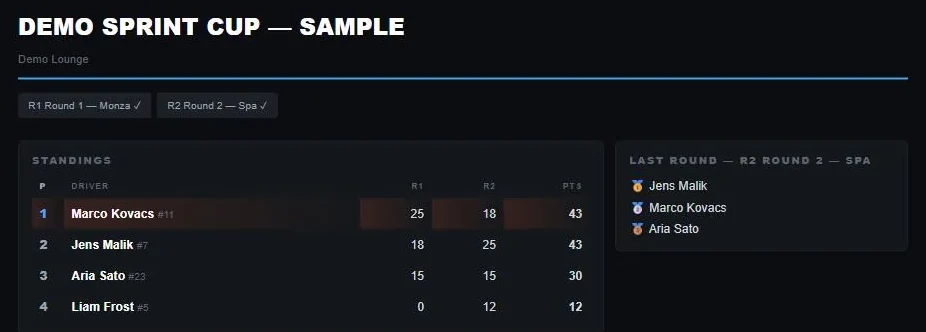
| League standings (/leagues/<id>) | The standings with points per round, dropped rounds dimmed and make-up points marked M, plus the round list. |
| Round results | A tab per session of the night, with laps, best lap, gaps and the penalties given with their reasons. |
| Head-to-head (/leagues/<id>/h2h) | Pick two drivers and compare them round by round. |
| Live timing (/leagues/<id>/live) | While a round runs: the live order with a track map. Good on a TV in the room. |
| Driver profile | A driver's league career and results. |
Discord
If your venue has Discord connected, league news posts to the league's announcement channel (or your venue default):
- New round when you add one. Draft leagues don't post new rounds.
- Round is LIVE when a session starts, with the join address and any required mods.
- Round confirmed with the results and standings, listing each night of the round when it had a make-up night.
- Make-up confirmed when a make-up night is confirmed.
Members can use the /league commands: standings, schedule, signup, me, car and withdraw. See Discord.
The venue API
With the venue API, your own website and tools can read leagues, standings, rounds (including each race night of a round) and round results per session. Webhooks league.round_confirmed and league.sitting_confirmed tell your systems when results are confirmed. The API chapter has the details.
Troubleshooting
- Start is greyed out on a group session
- Split the drivers into groups first: press Split into groups in Check in, or give each driver a group by hand.
- A main was skipped
- Nobody was left for it, because there were no more drivers than rigs.
- My grid change didn't stick
- The grid was rebuilt from the format's rule, or it was changed after the race started. Change it before the race starts, or set that race's grid to Set by hand each night.
- The race server is still running after the night
- ⋯ › Free the race server on the Tonight screen.
- I confirmed by mistake
- ⋯ › Reopen results. The round leaves the public standings until you confirm it again.
- Online drivers can't join
- Give them the join address shown on the Tonight screen. It appears once a session is on track.
- I changed the format but an old round didn't change
- Rounds that already have results, a hand-set grid, penalties or hand-made changes keep their own sessions. The save message lists them. Use Change tonight's sessions for one night.