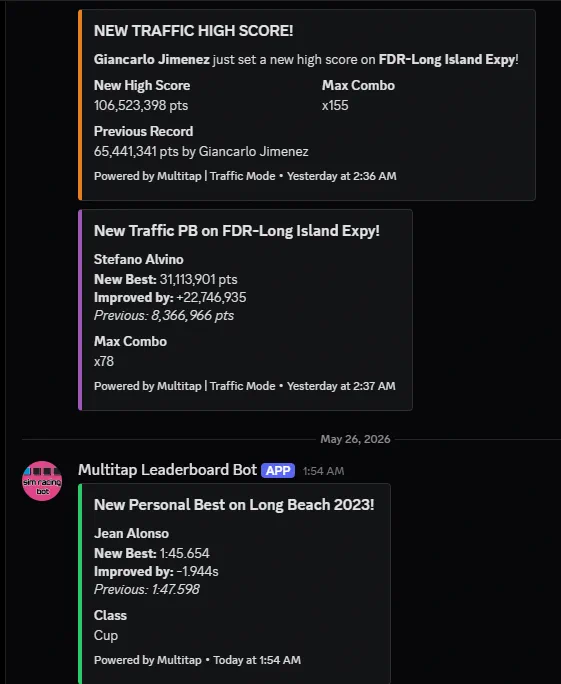
The Multitap bot is one bot, run by Multitap, that joins your venue's Discord server. Connect it once, choose a channel, and it posts the moment something happens on your rigs: a personal best, a top-ten entry, a record, a streak, a rivalry, a new car in the library. Your members get slash commands to pull up boards and stats without leaving Discord, and league drivers can enter championships from there.
Connecting
- Click Connect Discord.
You need a Discord server where you have the Manage Server permission. The Connect Discord button sends you to Discord's own site to pick a server and approve the bot. It only asks to view channels, send messages, embed links, and add its slash commands.
- Choose the server and click Authorize.
Pick the server you manage from Discord's list, then click Authorize.
- You're back on the Discord page.
It names the server you just connected and moves straight to choosing a channel, below. If something went wrong instead, a banner across the top explains it.
If something goes wrong
| What happened | The banner says | What to do |
|---|---|---|
| Cancelled | You cancelled in Discord. Nothing changed. | Click Connect Discord and go through it again. |
| Expired | Discord's approval expired (it lasts 10 minutes). Click Connect Discord to try again. | Click Connect Discord and finish within ten minutes this time. |
| Already connected elsewhere | This Discord server is already connected to Riverside Raceway. Disconnect it on that venue's Discord page first, or choose another server. | Disconnect it from that other venue first, or pick a different Discord server for this one. |
| Not confirmed | Discord didn't confirm the connection. Choose a server where you have Manage Server and click Authorize. | Click Connect Discord, pick a server where you have Manage Server, and click Authorize. |
Choosing a channel
Back on the Discord page the status reads Connected: choose a channel. Pick a text channel from the list; it is grouped into categories the same way your Discord server groups them, and an announcement channel is marked (announcement).
A channel the bot can't post in yet is marked (needs permission). Choose it anyway and the page shows the fix: in Discord, open the channel, then Edit Channel > Permissions, add the Multitap role, and allow View Channel, Send Messages, Embed Links. Back on the Discord page, click Check again to confirm it took; Save only lights up once it does.
Clicking Save sends a short "connected" note to the channel right away, so you know it worked before you leave the page: Test post sent to #channel, or the reason it failed and how to fix it.
The status line and the dashboard
Once connected, the Discord page always shows one of six states, and your dashboard shows the same thing in miniature.

| State | What it means | What to do |
|---|---|---|
| Not connected | Discord isn't linked to your venue. | Click Connect Discord. |
| Choose a channel | The server is linked but no channel is picked yet. | Pick a channel and click Save. |
| Posting to #channel | Records and leaderboard news are going out. Everything is working. | Nothing. |
| Last post failed | The most recent post didn't go through: usually a permission the bot lost, a deleted channel, or a channel outside your server. | Read the reason under the status line and follow it; it names the exact fix. |
| Bot removed from your server | Someone removed the Multitap bot from Discord. | Click Reconnect. Your channel choice is kept. |
| Multitap bot offline | Multitap's own Discord bot is down, not anything at your venue. | Nothing on your side; posts resume when it's back. |
Your dashboard's Discord line opens this page when you click it. Needs Attention lists the three states you can fix yourself: choose a channel, last post failed, and bot removed from your server. A bot that's offline, or a venue that hasn't connected Discord at all, doesn't need your attention.
Change channel, test post and disconnect
Once connected, a small Details toggle on the card shows the raw Server ID and Channel ID, if you ever need them for support. Three buttons sit below it:
| Button | What it does |
|---|---|
| Change channel | Reopens the channel list with your current channel already selected. Pick a different one and click Save, or click Cancel to keep what you have. |
| Send test post | Sends the same short "connected" note to your saved channel right now, and reports whether it arrived. |
| Disconnect | Stops posting to Discord, once you confirm. |
The Multitap bot stays in your server until you remove it yourself in Discord: Server Settings > Integrations > Multitap > Remove. Until you reconnect, its slash commands tell your members this server isn't connected.
What gets posted
Three presets set the toggles below for you. Changing any toggle by hand switches you to Custom.
| Preset | Turns on |
|---|---|
| Highlights (default) | Records, top 10, new cars and tracks, traffic |
| Everything | Every kind of post below |
| Custom | Pick below |
| Post type | Fires when | Setting |
|---|---|---|
| Track records | A driver takes P1 on one of your all-time boards. | At most one post per driver per board every 1 min (0 posts every time) |
| Record battles | Adds a line to a record post when the old record was set only minutes before, or when two drivers keep swapping it. | "Minutes before" means within 60 min |
| Top 10 | A driver enters a board's top 10 or moves up it, or takes P1 on a today, this week, this month or one-day board. | At most one post per driver per board every 10 min (0 posts every time) |
| New cars and tracks | New cars or tracks appear at your venue. | |
| Traffic mode | Include traffic-mode scores, following the choices above. | |
| Personal bests | A driver beats their own best time in the same car on that track. | At most one post per driver per car every 5 min (0 posts every time) |
| Improvement streaks | A driver sets several personal bests in a row. | Post at 3, 5, 10, 25, 50 in a row |
| First laps | Welcome a driver the first time they drive at your venue. |
Record battles stays greyed out while Track records is off; it only ever shows up inside a record post. Every number above is the starting default: type a new one and click Save Discord settings to change it. Only valid laps trigger the competitive posts. A tie is not a personal best. League events post as described in the Leagues chapter. Hotlap challenges post when one goes live, when it has a new leader (at most once every 10 minutes per challenge), and the final top 10 when it ends; see Challenges.
One post per lap, ranked like your TVs
Every lap gets at most one post, however much it did. The post leads with the biggest news and adds the rest as short lines underneath. The headline is picked in this order:
| Headline | Title in Discord |
|---|---|
| Record | 👑 New record on Spa-Francorchamps |
| Fastest in a window | 🏁 Fastest today on Event Tonight (also this week, this month, of the day) |
| Top 10 | 🏁 P4 on Spa-Francorchamps, or Up to P4 when the driver was already in it |
| Personal best | ⏱️ Personal best at Imola |
| Streak | 🔥 5 personal bests in a row |
| First lap | 👋 Welcome to Riverside Raceway |
The lines below the time read like Took it from K. Ito by 0.212., 0.874 behind D. Lee (P1)., Up from P7. or Also P1 today on Event Tonight. Gaps are always spelled out as faster or behind.
Positions come from your own leaderboards, ranked exactly the way their TVs rank them, and the post names the board and links its title to the board's public page. A lap that counts on several boards leads with the all-time one and mentions up to three others in a line each. When no board covers the lap's track and car, the post ranks it against the same class on that track instead and says so, as in P2 in GT3 at Imola, with no link. That fallback is the one place where classifying your cars on the Cars & Tracks page matters; a car with no class is ranked against itself.
Drivers appear under the same names your boards show, such as K. Ito. If you have switched off Show unmatched laps on leaderboard on the Leaderboard page's Screen appearance tab, a lap by a driver who isn't linked on the Drivers page gets no post at all, and never shows up as the holder someone beat. Traffic scores are not affected by that switch.
Every post uses your venue's brand colour from Settings, puts the driver's name at the top, and carries your venue name and logo at the bottom. The game's name is added there only if your venue runs more than one game. Posts never ping anyone.
Recent posts
Under the post types, Recent posts lists what the bot announced lately, newest first: the time, the driver as your boards name them, what it was and where, for example K. Ito New record, Personal best on Spa-Francorchamps. One lap is one line even when the post carried several pieces of news. Before the first post it says Nothing posted yet.
Invite link
Near the bottom of the page, under "Discord invite for your public pages", the Invite link field shows on your public league pages as Race from home. Paste a link that starts with https://discord.gg/, https://discord.com/invite/ or https://discordapp.com/invite/; anything else shows an inline error and blocks Save. Leave it empty to hide that card.
Make it one that never expires: in Discord, right-click your channel, then Invite People > Edit invite link > Expire After: Never > Generate a New Link.
It saves with everything else on the page: Save Discord settings at the bottom.
Slash commands
Members of a connected server can type these in any channel. Game choices are Assetto Corsa, ACC and iRacing; track and car fields autocomplete from your library.
| Command | Reply |
|---|---|
/leaderboard | The top ten for a game on one track, optionally one class, ranked like your boards. Defaults to your most-driven track. Each row shows the gap to P1, and the car when the rows mix cars. Links to a matching all-time board if you have one. |
/stats | A driver's totals: laps, valid laps, tracks, cars, best lap and games. Takes the name the boards show, a board name or the in-game name. |
/records | The P1 of each of your lap boards for that game, as their TVs show it, up to fifteen. With no boards set up, the fastest lap on each track. |
/recent | The latest valid laps, up to 25. |
/traffic | The traffic top ten for a track, with score and best combo. Defaults to the track with the most scores, and links to its traffic board if you have one. |
/tracks | The track list for a game, filtered by region or search term. |
/classes | Car classes with counts. |
/cars | Cars in a class, or matching a search. |
/car | The fastest laps in one car, per driver and track. Suggests cars by their full names. |
/league … | Standings, schedule, signup, me, car and withdraw. See Leagues. |