A leaderboard in Multitap is a saved set of filters: this track, these cars, this time period. You can have up to twenty of them, and each one has four display addresses you open on a TV. Laps flow onto the boards automatically; a driver who crosses the line sees their name on the screen before they have unbuckled.

The Leaderboard page
The page has three parts. Leaderboard Instances at the top is the table of your boards. Below it, Preview shows the top ten of whichever board you click, and Activity Feed shows the latest laps across the venue.
The boards table lists each board's name, game, track, class, date filter, and whether autoscroll is on. Each row has four icon buttons: Preview, URLs, Edit and Delete. Delete asks for confirmation; any TV pointed at a deleted board stops updating.
Creating a board
Press New Board.
| Field | What it does |
|---|---|
| Name | Required. Shown in the admin list only; the TV shows the track. |
| Game | Assetto Corsa, ACC or iRacing, from the games you have enabled. |
| Track | Tracks that already have laps in that game. Layouts are listed as separate tracks. |
| Car Class | All, or one class from your car metadata. Reclassifying a car on the Cars & Tracks page changes which boards it appears on. |
| Car | All, or one car that has laps. |
| Date Filter | All Time, Today, This Week (from Monday), or This Month. |
| Organization | All drivers, or one organization, so the board ranks only its members: a company's event board, say, or a school league. Archived organizations are marked and still work. Not offered on traffic boards. |
| Autoscroll | On, and a board with more rows than fit on a page cycles through its pages. |
| Scroll Interval (sec) | Seconds per page, 10 by default. |
| Include VenueLaps times | On, and once your venue is linked to VenueLaps the board also shows the best times set on the same track at other venues, each tagged with a small globe and the venue's name. Nothing leaves your venue; it is read-only. See the VenueLaps chapter. |
| Show organization | No by default. Yes, and the TV shows each registered driver's organizations as a small muted tag after their name, in every layout. Archived organizations are left out. Lap boards only. |
Press Create. Edits to a board reach the TVs within about ten seconds without reloading anything.
A TV shows the organization saved on the board; there is no way to change it from the address. If the saved organization can't be found, the board shows all drivers rather than going blank. The Discord /records command uses the board's organization too.
How rows are ranked
A board shows one row per driver per car: their best valid lap on that track. Rows are sorted fastest first. A driver whose only laps are invalid still appears, faded and struck through, after every valid row, so a cut corner is visible rather than hidden. The Laps column counts all of that driver's laps in that car on that track. Gaps are measured to the fastest lap of the whole board.
Two settings on the Leaderboard page's Screen appearance tab shape every board: Rows per page sets how many rows each page of the TV shows (10 by default, 5 to 30; a board can set its own in its settings), and Show unmatched laps decides whether in-game names that are not yet linked to a registered driver appear at all. Turn it off and the board shows only registered drivers, which some venues prefer for a cleaner screen.
Putting a board on a TV
Press URLs on a board. Four addresses are listed, each with a copy button. Open one in a browser on the display PC, press F11 for full screen, and leave it. Traffic boards list three addresses, as they have no plain landscape layout.
| Layout | Use it for |
|---|---|
| Portrait | A TV mounted on its side. The standard look. |
| Landscape | A normal 16:9 TV. |
| Hi-Fi Portrait | The same data with animation: rows slide in, a new fastest lap flashes gold, an improved row flashes green, positions glide when they change. |
| Hi-Fi Landscape | The animated layout for a 16:9 screen. |
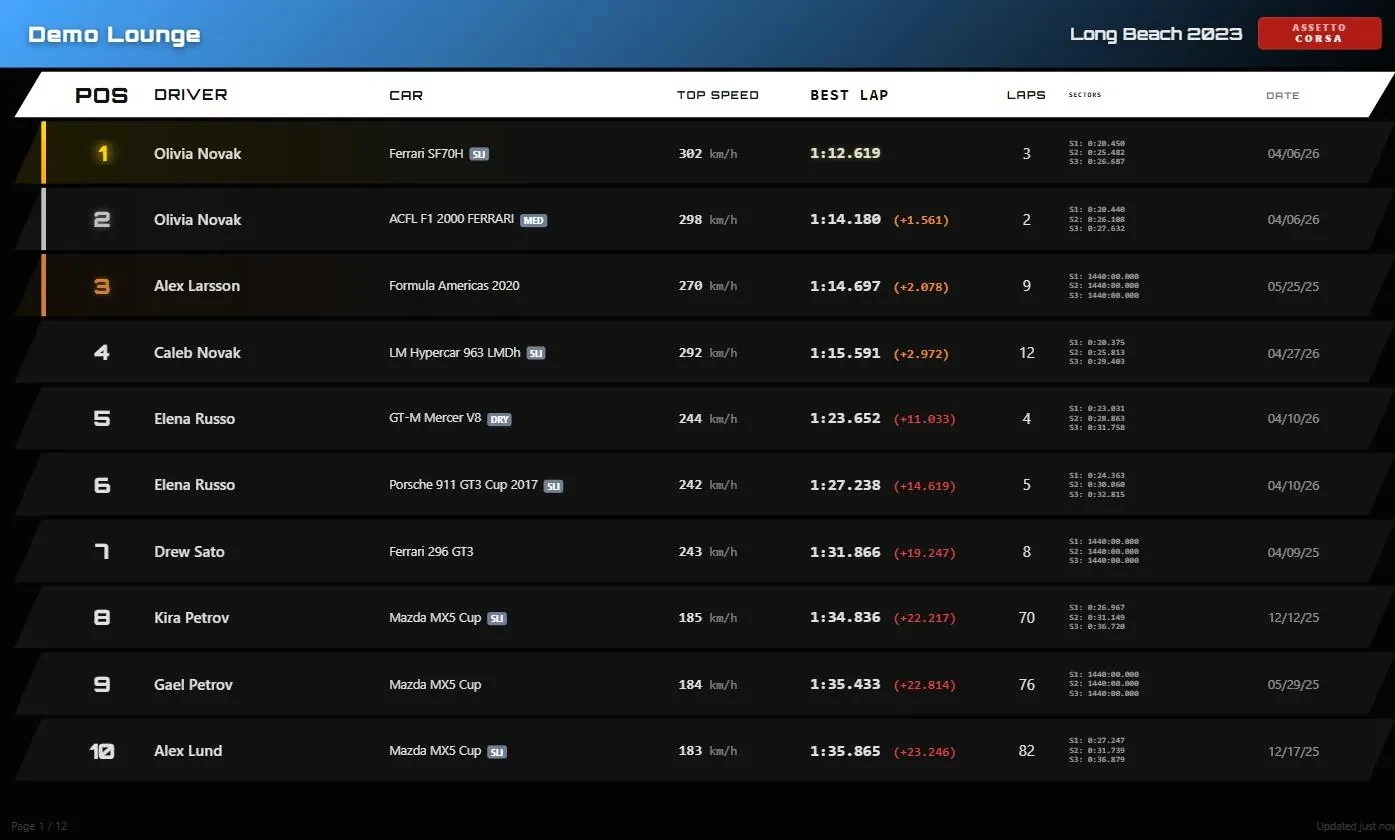
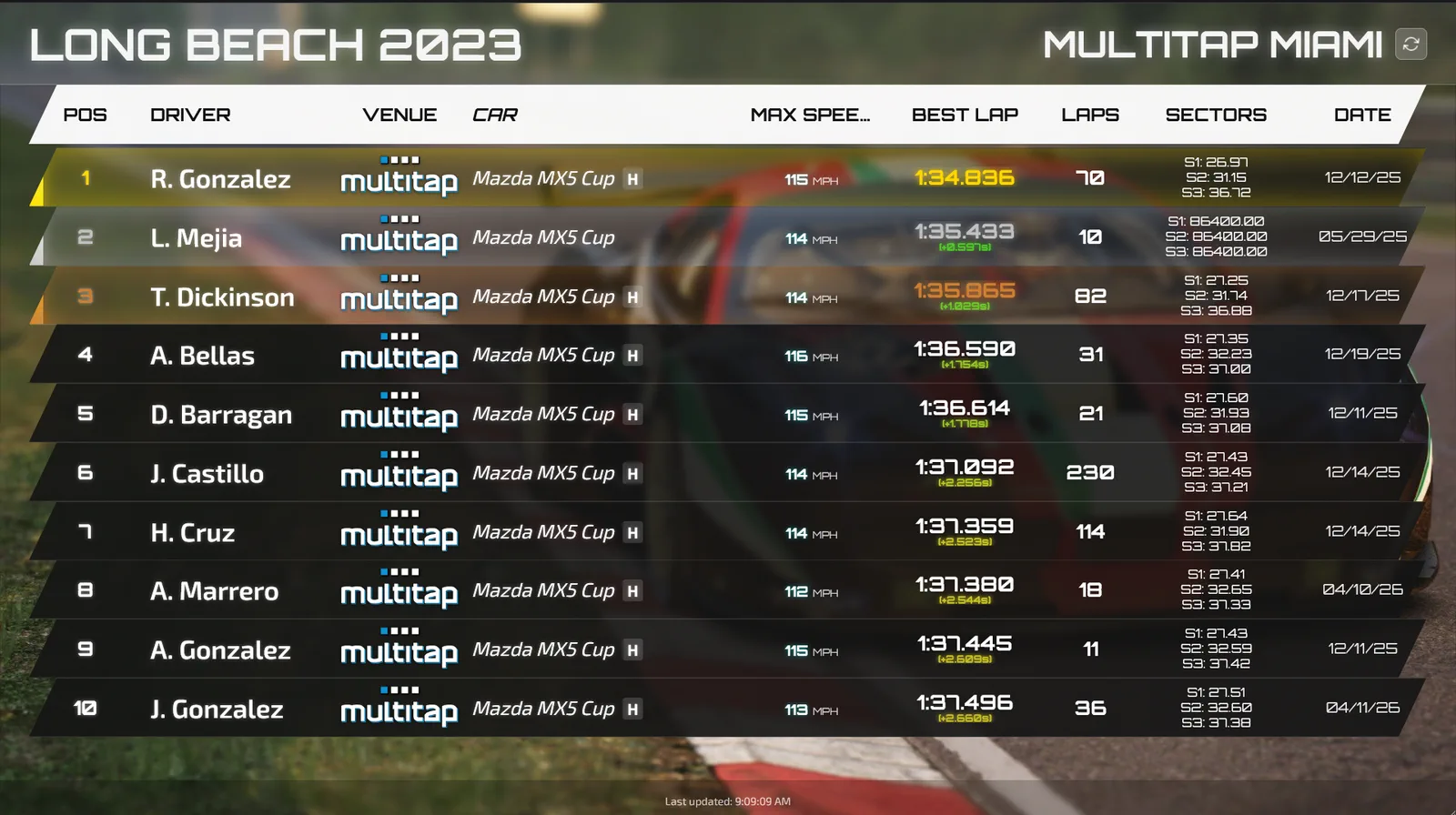
Every layout shows your logo and venue name in the header, the track on the right, and columns for position, driver, car with a tyre badge, top speed, best lap with the gap to first, lap count, sectors and date. The top three get gold, silver and bronze rank bars. A footer notes when the data was last updated and, when autoscroll is on, which page is showing. Rows shrink to fit the screen, so every row on a page stays visible above the sponsor strip, whatever the screen size or the rows per page.
Drivers who are linked to a registered record appear as F. Lastname. Everyone else appears under their in-game name. On a board with Show organization set to Yes, a registered driver's organizations follow the name in small muted text.
Themes and branding
Themes are venue-wide and live under Leaderboard › Screen appearance, together with board colours, the columns your screens show, sponsor logos, the background image, rows per page and the activity feed style. The preview beside the settings is the real TV page, and it shows your changes before you save. Press Save appearance and screens that are already on pick the change up within a minute, with no reload.
| Theme | Look |
|---|---|
| Dark Racing | The default. Skewed rows over your background image with a dark overlay, subtle motion. |
| Neon Arcade | Orbitron type, neon borders and glow, full animation. |
| Carbon Fiber | Straight rows on solid dark, no animation, red first place. |
| Clean Minimal | Light background, straight rows, no animation. |
| Custom | Choose the font (Segoe UI, Orbitron, Exo 2, Arial or Consolas), the row style (skewed or straight) and the animation level (subtle, full or none). |
Primary Color is the accent for the header bar and highlights; it is also the accent of the admin panel and the rig launcher. It and the Venue Logo are your brand, so they stay under Settings › Branding. The background image uploads on the Screen appearance tab and takes effect immediately; Remove clears it when you save. Images can be PNG, JPG, GIF or WebP up to 5 MB.
Under Columns, Lap board columns sets which columns your lap boards show and in what order; Driver and Best Lap always stay on. The Venue column follows each board's Include VenueLaps times setting rather than the tick alone. On a board with it off, Venue never shows, even if ticked. On a board with it on, Venue always shows: where you placed it if it is ticked, otherwise at the end. Traffic boards have their own column list below.
Leaderboard names
On the Screen appearance tab, under Rows and names, Leaderboard names sets how driver names show on your leaderboards, challenge boards and traffic boards: E. Lastname (the default), Full name, First name and last initial or First name only. Discord and emails keep E. Lastname. If a style would make two different drivers look the same on one board, the board adds a last initial to tell them apart. Open Track boards can use their own style; see Name styles.
The activity feed
The activity feed is a display for the room rather than for a single track. It watches every lap at the venue and calls out the ones that matter: a new record on a car and track, a personal best, a driver's first ever lap, and a driver's first lap on a new track. On the admin page it is the panel on the right, with a game filter. For a TV, open your-venue.mlttp.com/leaderboard/activity/ or the landscape version at /leaderboard/activity/landscape/.
The Screen appearance tab offers two styles under Activity Feed Style. Toast Popups shows each new milestone as a card for fifteen seconds. Scrolling Ticker adds them to a strip that runs along the screen.
The live leaderboard
The live leaderboard is one screen for your venue that follows whatever is running. Open your-venue.mlttp.com/leaderboard/live/ on a TV and leave it there: nobody has to touch it, and it fits itself to a portrait or landscape screen. It is part of Multitap Cloud, not Cloud Lite.
| When | What it shows |
|---|---|
| A group or league race | Every car on the track map as it drives, collisions and cuts as they happen, and the standings beside the map with gaps, last laps and best laps. With more than one race running it switches between them every 30 seconds, and it never leaves a race on its final lap. |
| A traffic session | The traffic map with the drivers on it and their runs. |
| Right after a race | The podium and the finishing order, for two minutes unless you change it. |
| Nothing running | The slides you pick: the last race summary, your sponsor images and your venue video, one after another. |


Setting it up
The Live leaderboard card on the Boards tab of the Leaderboard page decides what the screen shows when nothing is live. Under When nothing is live, show, tick any of Last race summary, Sponsor images (from Screen appearance) and Venue video (Broadcast idle video). Seconds per slide takes 5 to 120 (20 to start with) and Seconds to show a race result takes 0 to 600 (120 to start with; 0 skips the result screen). Press Save and your screens pick it up within a few seconds.
Preview shows what is live now, or a sample race, qualifying, result, traffic or idle screen, so you can see the look before a race. URL gives you the address to copy. The Links page and the kiosk's Links screen list the same address.
A screen with no PC: the Raspberry Pi
The live leaderboard screen is a ready-made SD card that turns a Raspberry Pi 4 or newer into a screen for your live leaderboard. It starts by itself when it gets power and never needs a mouse or keyboard. You need the Pi with its power supply, a micro-HDMI to HDMI cable or adapter, an SD card of 8 GB or more, and balena Etcher on a computer.
- In the admin panel, open Settings › Downloads and find Live leaderboard screen. Type your Wi-Fi name and password, or leave both blank if the Pi uses a network cable, pick how the TV is mounted, and press Download the SD card image. The file is about 1 GB.
- In balena Etcher, choose the file, choose the SD card and press Flash. If Windows asks to format the card afterwards, press Cancel; formatting erases it.
- Put the card in the Pi, connect it to the TV with HDMI using the port next to the power socket, and plug in the power. You see the Multitap logo, then "Connecting to" your venue address, then your live leaderboard, in about a minute.
Leave it on. It's safe to unplug at any time, and every restart starts clean. To change the Wi-Fi or the rotation later, put the card in a computer, open the drive called bootfs and edit multitap-tv.txt: the wifi_ssid and wifi_password lines, and orientation (landscape, portrait, or portrait-flipped if the picture is upside down). Or download a new card. Your Wi-Fi password goes into the file only and Multitap doesn't keep it, but it sits on the card as plain text, so keep the Pi where guests can't take the card.
Hidden networks, guest Wi-Fi with a sign-in page, networks that ask for a user name, and WPA3-only networks don't work yet; use a network cable for those. If the TV says No signal, push the micro-HDMI plug in firmly and use the port next to the power socket.
The traffic leaderboard
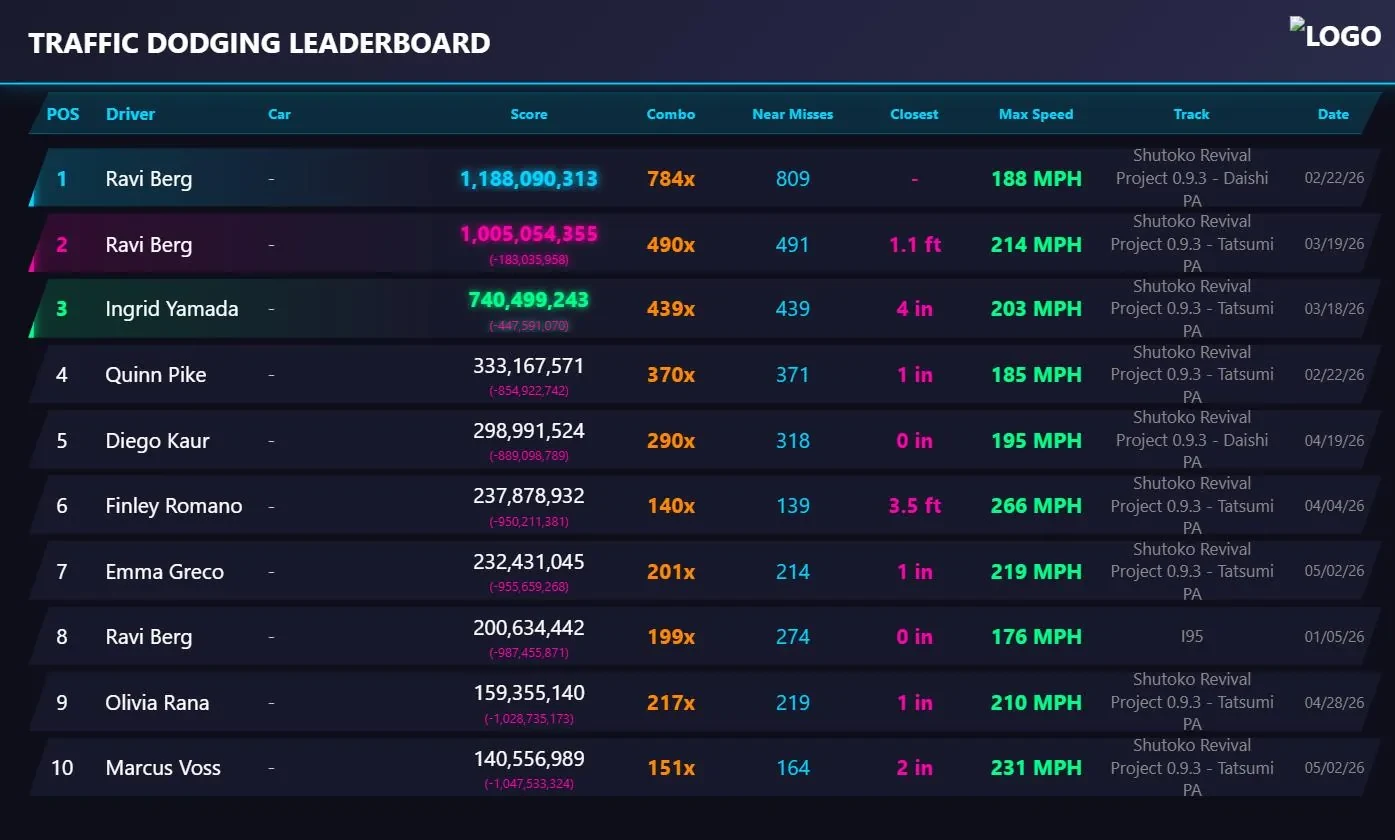
Traffic sessions have their own display at your-venue.mlttp.com/traffic_leaderboard/, ranking each driver's best score per track with combo, near misses, closest pass, top speed and date. It refreshes every ten seconds and has a hi-fi portrait and landscape variant like the lap boards. The scoring rules are in the Groups chapter.