The venue API is included with every Multitap Cloud venue and opens your data to your own website and tools. A key in a header, a request to your-venue.mlttp.com/api/v1/, and you have your leaderboard as JSON for your homepage, your drivers for a mailing tool, your league standings for a widget, or a booking created from a form you designed. Webhooks work the other way: Multitap calls your server, with a signed message, the moment a lap lands or a record falls.
API access
Every Multitap Cloud venue has the API turned on when the venue is set up. The API page in your admin panel then shows an Enabled badge, your rate limit and monthly quota, a usage panel and the key and webhook managers. If the page shows only a short description and a link to the reference, the API is off for that venue; contact Multitap.
The API page

Usage This Month
Requests so far this month against your quota, how many remain, a bar that turns amber past 70 percent and red past 90, and a sparkline of the last thirty days.
API Keys
Press Create Key.
| Field | What it does |
|---|---|
| Type | Secret keys start with sk_ and are for your server. Never put one in a web page. Publishable keys start with pk_ and are for browser code on your own site: they are read-only and only work from the origins you list. |
| Label | A name for your own reference, such as Venue website. |
| Include driver contact data | Secret keys only. Grants the driver endpoints, which include names, emails and birthdates, and the organizations list. Leave it off unless the integration needs them. |
| Create and cancel bookings | Secret keys only. Grants the booking:write scope, which lets your own booking form create and cancel bookings through the booking endpoints. Publishable keys stay read-only. |
| Allowed origins | Publishable keys only. One website origin per line, for example https://www.yourvenue.com. Browser requests from anywhere else are refused. |
The full key is shown once, in a Copy your key now dialog. Store it; it cannot be displayed again. The table lists each key's prefix, label, type, scopes, who created it and when it was last used. Revoke stops a key immediately after a confirmation. You can hold up to ten active keys.
Webhooks
Press Add Endpoint, enter a public https:// address on your server, and tick the events you want. A signing secret is shown once, and can be revealed again later from the table. Each endpoint row has Secret, Rotate, Test (sends a ping and reports the response time), Deliveries (the last 25 attempts with status and timing), Disable or Enable, and Delete. Up to five active endpoints.
| Event | Sent when |
|---|---|
lap.completed | Any lap is recorded, valid or not: game, driver, car, track, time, sectors, validity, tyre, top speed and cuts. |
personal_best.set | A valid lap beats the driver's previous best on that car and track, with the previous time. |
record.broken | A valid lap takes first place for a class and track, with the previous holder and time. Ticked by default. |
league.round_confirmed | A league round is confirmed: the top ten and links to the standings and results. |
league.sitting_confirmed | A league make-up night is confirmed: each driver's result and the round it counts for. |
Deliveries are signed with an X-Multitap-Signature header containing a timestamp and an HMAC-SHA256 of the body, so your server can verify each message came from Multitap. A delivery that does not get a 2xx response is retried at one minute, five minutes, thirty minutes and two hours before being marked dead. An endpoint that fails ten times in a row is disabled automatically until you re-enable it.
Using the API
curl https://your-venue.mlttp.com/api/v1/leaderboard?track=monza \
  -H "Authorization: Bearer sk_your_key"
Responses wrap results in a data field with paging information in meta. Errors carry a code and a message. Every response includes rate-limit headers so your code can back off. Limits are per key per minute, with publishable keys getting half the venue's rate, and a monthly quota shared across keys.
Endpoints
| Endpoint | Returns |
|---|---|
GET /venue | Venue name, branding and enabled games. A handy key check. |
GET /usage | This month's request count and quota. |
GET /leaderboard | Best valid lap per driver, filtered by game, period, track, car, class or organization (organization_id), paged. |
GET /laps | Full lap history with the same filters, except organization, plus player and validity. |
GET /activity | Recent laps with their milestone, for a live ticker. |
GET /drivers, /drivers/{id}, /drivers/{id}/stats | Registered drivers, their linked names, and their statistics. Each driver lists its organizations, archived ones included, and GET /drivers takes organization_id to list one organization's members. Needs the driver contact scope. |
GET /organizations | Your active organizations with their id, name, link slug and member count. Needs the driver contact scope, so publishable keys can't read it. |
GET /leagues, /leagues/{id}, /leagues/{id}/standings, /leagues/{id}/rounds | Leagues, standings and rounds, including each race night of a round. |
GET /rounds/{id}/results, /rounds/{id}/laps, /rounds/{id}/incidents | Results, laps and incidents for a round. Results can be read for one session of the night. |
GET /traffic/leaderboard, /traffic/players/{name} | Traffic scores by track, and one player's history. |
GET /content/cars, /content/tracks | Your catalogue with display names, classes, regions and preview image links. |
An archived organization's id still works as a filter. An id that doesn't exist returns a 422 with the code invalid_params.
Booking endpoints
| Endpoint | Purpose |
|---|---|
GET /booking/config | Durations, slot increment, opening hours, prices, terms and bookable rigs. |
GET /booking/availability | Free start times for a date and duration, optionally for a party size and rig type. |
POST /booking | Creates a confirmed booking and queues the confirmation email. Needs a secret key with the booking write scope. |
GET /booking/{id} | One booking. |
POST /booking/{id}/cancel | Cancels it. Needs the same booking write scope. |
Reference
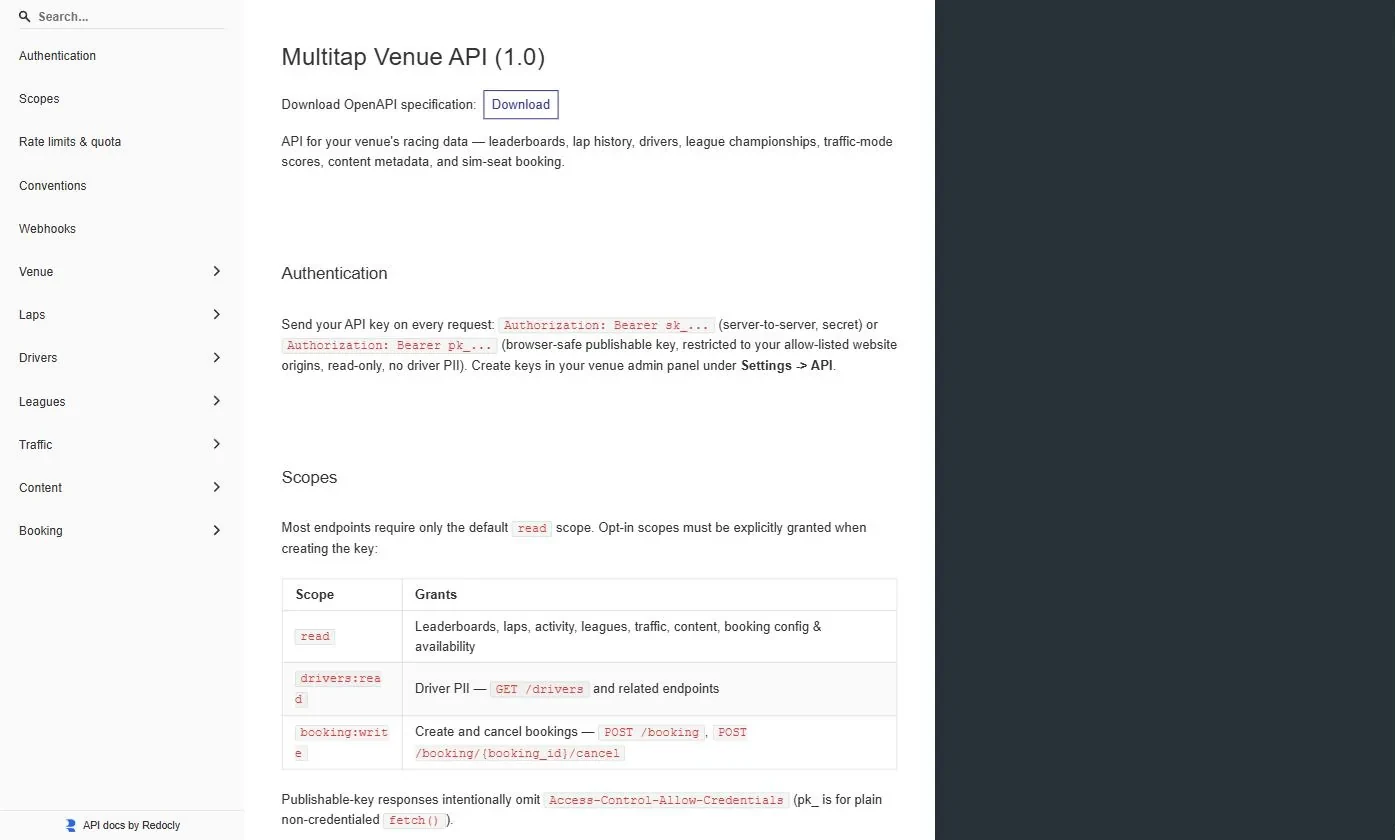
The full reference, with every parameter, response schema, error code and a webhook verification example, is published at your-venue.mlttp.com/api/docs. It is public, so your developer can read it before a key exists.