Sim racing traffic management usually means one thing to a driver: how you get past a slower car, or let a faster one through, without both of you ending up in the gravel. At a venue it means something bigger. You're putting a birthday group, two regulars and somebody's uncle who has never touched a wheel onto the same grid, and the way you set that race up decides whether people leave buzzing or leave annoyed. Most of the traffic problems on a venue grid are solved before the lights go out, in the session settings, not by lecturing anyone about blue flags.
Here's how we'd handle on-track traffic in group races at a sim center, using the controls Multitap gives staff on the Groups page.
Why sim racing traffic management looks different at a venue
Online, drivers pick a server that suits their pace. In your building, the grid is whoever walked in together. That means a spread of pace you'd never see in a ranked lobby, and it means the slow driver isn't a stranger. It's their friend, their kid or their coworker, and a punt into turn one is a story they'll tell about your venue, not about the game.
So the goal shifts. You aren't trying to make the race fair in a strict sporting sense. You're trying to keep the field spread out enough that traffic happens a few times a lap instead of a few times a corner, and to make the moments when cars do meet low stakes. Damage, assists, session order and car choice all feed into that, and they're all things staff pick in about a minute when they start a race.
Set the race up so traffic sorts itself out
When staff press Start New Race on the Groups page, the session drawer has a handful of settings that do most of the traffic work for you. The full reference lives in the Groups guide, but these are the ones that matter for a mixed grid.
- Mode. Standard turns off fuel use, damage and tyre wear and forces ABS and traction control on, which is the right call for first timers. Pro means full fuel use, full damage, tyre wear and factory assists only. For a walk-in group, Standard takes most of the sting out of contact, because nobody's race ends on a bent suspension.
- Damage. Under the race rules you can set damage anywhere from 0 to 200 percent, where 100 is realistic. A crowd of regulars might want it on. A party probably doesn't.
- Practice and qualifying. Practice defaults to 10 minutes and qualifying to 5. Keep qualifying when the pace gap is big, because it puts the quick drivers at the front where they can pull away instead of carving through the whole field on lap one. Set it to 0 and the race starts from the join order, which is fine for a group of friends who'd rather just go.
- Race length. Run it on time or on laps. Short races mean fewer laps where a leader catches the back of the field, which is a quiet way to cut down on lapped traffic.
- Car selection. Same Car for All gives everybody the same machine, so the pace gap is only the drivers. Driver Chooses lets each driver pick a car and livery on their own rig, with a class filter, which can make for a mixed field where faster cars have to work their way past slower ones. That's real multiclass traffic, and it's great with a crowd that wants it and chaos with one that doesn't.
Once a setup works for a certain kind of group, save it as a Quick Start. Next time a party books in, staff click the card, tick the rigs, type the names and launch, and the traffic-friendly settings come along with it.
Managing traffic from the desk while the race runs
Settings get you most of the way, but a race is live and people are unpredictable. Each running race shows up as a tile under Active Races, and expanding it gives staff a row for every rig with a few tools that are handy when traffic gets messy.
The live assists panel for a rig can switch the ideal line on or off and change gears between auto and manual, which helps the driver who keeps missing braking points and stacking up the cars behind them. It also has Send to pits, which puts a car back in its pit box when someone is stuck facing the wrong way on the racing line. The Message box shows a line on that driver's screen, so staff can send a quick note about letting the leaders through, or use a ready-made line like 5 minutes left. ABS and traction control stay with the driver.
If a first race turns into a demolition derby, the session controls let you reset without tearing the whole thing down. Restart runs the current session again from the beginning, and Next moves to the following session, for example from practice into qualifying. Race rules like damage, tyre wear and auto clutch can't change mid-race, so you can queue changes on the tile and relaunch with them, and the drawer reopens with the same track, cars and drivers filled in.
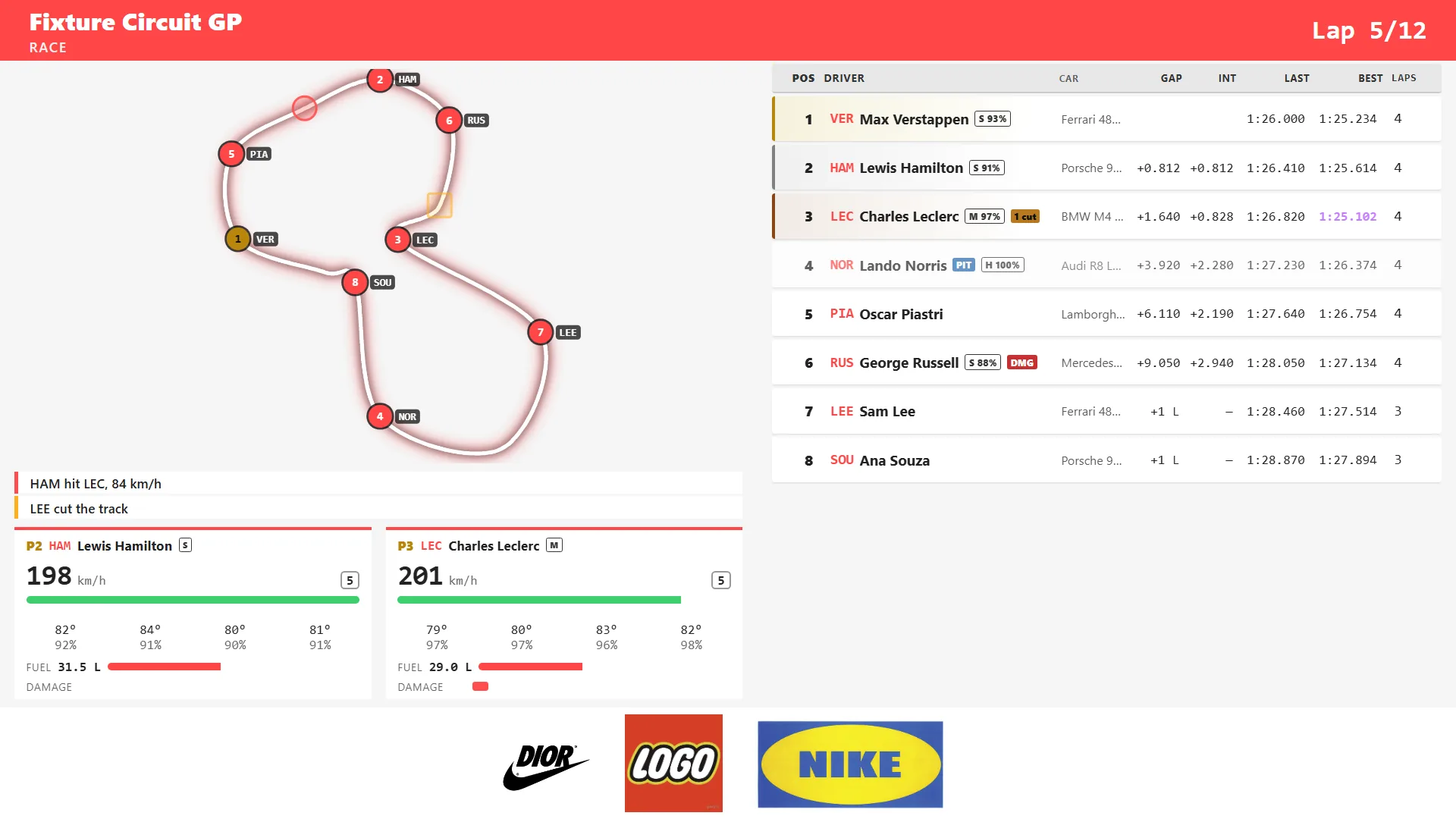
On Multitap Cloud, the live leaderboard is the other half of this. Put it on a TV and during a group race it shows every car on the track map with collisions and cuts as they happen, plus the standings with gaps, last laps and best laps. Staff can glance up and see exactly where the trouble is, and the crowd gets to watch it too. On the lap boards, a driver whose only laps are invalid shows faded and struck through below the valid times, so a cut corner never quietly tops a board.
Where traffic dodging fits in
There's one more kind of traffic worth mentioning, because it's the one a lot of players picture when they hear the phrase. Traffic sessions put a group of rigs on a shared road full of AI cars to weave through, and contact ends a run instead of somebody else's race. It's a good place to send a group that clearly isn't ready for wheel-to-wheel racing, and we covered the scoring and board in our post on traffic dodging nights. One order worth trying is a short traffic session first and a group race second, though that's a call you'll make from watching your own floor.
If you'd like to see how race setup and live controls feel from the desk, have a look at Multitap or book a demo and we'll walk you through a group race start to finish.
See Multitap in Action
Explore lap-triggered marketing, VenueLaps and the Discord engine in the self-guided public demo.
Try the Demo →