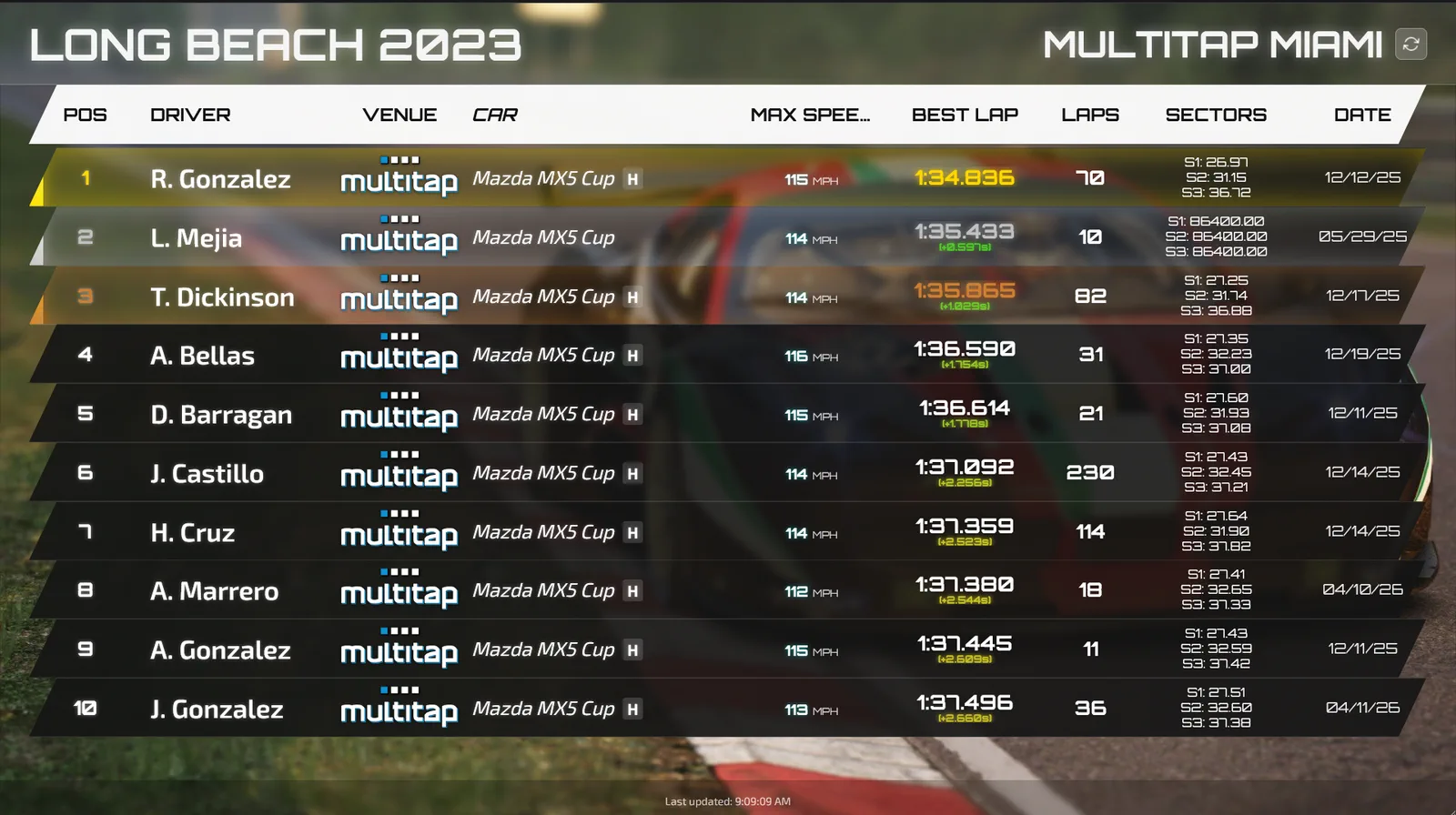
A hotlap challenge is the simplest competition a sim racing venue can run: one car, one track, a deadline, and a board that says who's fastest. The hard part isn't the idea. It's the admin. Somebody has to open the server on time, keep the conditions identical for two weeks, police track limits, tell people they've been knocked off the top spot and close it all down at midnight on the last day. Good sim racing hotlap challenge software does all of that on its own, so your staff can stay on the floor and your racers keep coming back to shave off another tenth.
Here's how we think about running one well, and what the software behind it should actually handle.
Why a hotlap challenge works for a sim racing business
Most of your customers will never race in a league. They don't want to commit to a fixed night every week, and they're not sure they're fast enough to line up wheel to wheel with regulars. A hotlap challenge asks for none of that. A driver can show up on a Tuesday afternoon, put in twenty minutes, see where they land, and come back on Saturday with a friend to try again. That's the whole loop, and it's the reason challenges are such a good fit for a racing simulator business that lives on repeat visits.
It also fills a gap your regular leaderboards can't. A permanent board on a popular track gets stale once the top times are out of reach for normal people. A challenge resets the clock. New car, new track, fresh board, and everyone starts from zero on day one. Run a weekly board and a month-long challenge side by side and you've given drivers a short-term reason and a long-term reason to book another session.
What sim racing hotlap challenge software should handle
If you've ever run one of these by hand with a spreadsheet and a whiteboard, you know where it breaks. In Multitap Cloud, challenges live under Admin panel, Challenges, and the builder walks you through seven numbered cards: the name and description, the car and track, the dates, who can race, the track conditions, the driving rules, and the public page extras like rules and prizes. A challenge can run for up to 90 days. Here's what matters most once it's live.
- It opens and closes itself. Multitap opens the server at the start time, records every valid lap, and closes the board at the end time without anyone pressing a button. Nobody has to remember to stay late on the final night.
- Conditions are frozen. Weather, time of day, air temperature, road temperature and grip are locked for the whole challenge, so a lap set on day one and a lap set on the last night are driven in the same conditions. Once a challenge is scheduled, the car, track, conditions and driving rules are locked too.
- Assists are the same for everyone. You pick Pro (manual gears, no racing line) or Standard (beginner-friendly assists such as auto gears and the racing line). Pick Standard if your crowd is mostly walk-ins, Pro if you want your regulars sweating.
- Fair rules without arguments. Only laps set between the start and end count, a lap with a cut isn't valid, and if two drivers set the same time the earlier lap wins. If someone complains about track limits, Strike lap removes one lap and the driver's next best lap takes its place.
- Sending rigs in is one click. While a challenge is live, you tick the rigs you want and press Send. An idle rig gets a driver name and a timer, 15 minutes by default.
One thing to know up front: a challenge runs on its own Assetto Corsa server, so this is an Assetto Corsa format. Challenge servers don't count against your rigs, either.
Opening your sim racing centre's challenge to home drivers
This is the part most venues haven't tried yet. When you build a challenge you choose In-house + home drivers, In-house only, or Home drivers only. With home drivers allowed, your rigs take their seats first and the rest of the track's pit boxes go to people racing from their own setups (10 home seats by default). The builder does the sums for you and warns you when the track is too small for the number you asked for.
A home driver needs Assetto Corsa, Content Manager and any mod content you've listed in the download links. On the public page they press Join with Content Manager and they're on the right server. Nobody types a Steam ID, because Multitap recognises each driver by the Steam account Content Manager connects with. A badge on the board marks each driver as In-house or Remote.
Why bother? Because your regulars don't stop thinking about your venue when they leave it. Letting them chip away at a time from home keeps your name in their week, and the fastest home drivers tend to want to see what they can do on your rigs. Laps set from home count for the challenge only and never appear on your venue boards, so your normal leaderboards stay clean.
Getting people to notice: pages, screens, emails and Discord
A challenge nobody sees is just a quiet server. Every scheduled, live or ended challenge gets its own public page at your venue's address with a countdown, the board, your description, prizes and rules. There's also a TV display that shows the top 15 in large type, built for a screen in the room. Shared in a group chat or on social, a challenge link unfurls into a card with the title, the car and track and the current top three.
The follow-up is where it really pays off. When driver emails are switched on, challenges send three emails of their own:
- New Challenges goes out when a challenge goes live, to registered drivers who agreed to emails and raced at your venue in the last six months, plus anyone who signed up on your challenge pages.
- Challenge Spot Lost goes to a driver who just got pushed out of first or out of the top three, at most once a day per challenge, with a button to go and win it back.
- Challenge Results lands when it ends, with each racer's place, best lap and gap.
That middle one is the email that books sessions. Nothing gets a competitive driver back in the seat faster than finding out somebody took their spot. If your Discord is connected, the bot posts when a challenge goes live, when there's a new leader, and the final top 10 when it ends.
A few practical tips: put the TV display on a screen near the door, print the public page's address on the counter, and post the link in your Discord the day it opens. Prizes are yours to hand out (Multitap only displays the text), and a prize as small as a free hour keeps people chasing the top spot. Keep the car approachable so first-timers don't spin out of every corner, and match the length to your traffic: a week for a quick buzz, a month if you want regulars grinding.
Where challenges fit in your sim racing event software
Challenges sit alongside the rest of the event modes in Multitap Cloud, including group races, practice and hotlaps, traffic dodging and leagues. They're not part of Cloud Lite, and the offline Multitap Event edition leaves them out because they need the internet. You can see everything that's included on the features page, and the full setup steps are in the challenges guide.
If you want to see a challenge builder in action before you commit, book a free demo call and we'll walk you through setting one up for your floor, or head back to the Multitap home page to start a free trial. Your racers already want to know who's fastest. Multitap just keeps score.
See Multitap in Action
Explore lap-triggered marketing, VenueLaps and the Discord engine in the self-guided public demo.
Try the Demo →