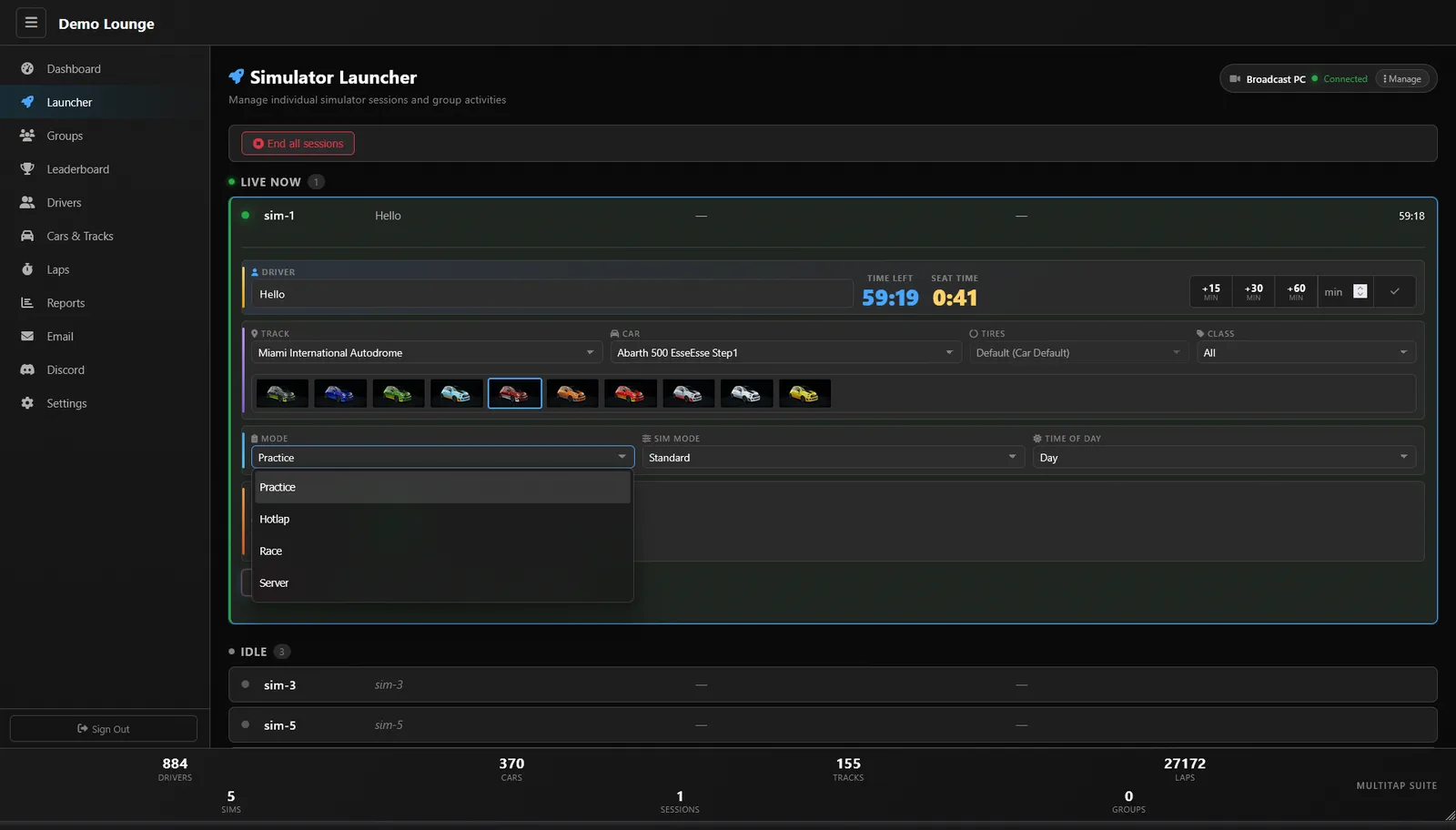
A keyboard free sim racing launcher sounds like a small detail until you watch a first-timer climb into a rig and stare at a Windows desktop. On Multitap, the launcher runs full screen on every sim with Windows hidden behind it, and the racer drives everything with the wheel, paddles and a button box, with no keyboard or mouse involved. This post walks through it the way a customer actually meets it, one screen at a time, plus the few spots where your staff still step in.
We covered the bigger rig picture (content sync, driver profiles, the spectator feed) in racing simulator management software, rig by rig. This one stays in the seat.
Before the session: attract, demo and standing by
When nobody's on a rig, it plays a rotation of driving clips with your venue name, the rig's number and two lines of text: READY WHEN YOU ARE and a pulsing PRESS ANY BUTTON. Any button, a pedal press or a turn of the wheel wakes it. If you'd rather show your own brand, Settings, Rigs, Launcher idle screen lets you play your venue's video on every free rig or swap in your own headline and prompt.
You can go a step further with Demo mode. Free Assetto Corsa rigs leave the attract screen and race each other with Multitap's own AI driver, and the wheel turns by itself to follow the steering, so someone walking past sees a real car being driven. When they grab the wheel or press a pedal, they get a short free turn (the strip at the top might read something like one lap or two minutes) with no login. When it ends, the screen says Check in with staff. Demo laps never count on your leaderboards, so nobody's free spin pollutes the real board.
Once a rig is awake and waiting for a paid session, it shows STANDING BY with the message that the session starts at the front desk. A small RIG STATUS card reads CONNECTED or OFFLINE, which is handy for staff glancing across the floor.
How the keyboard free sim racing launcher runs the wizard
This is the part customers actually drive. If the rig offers more than one racing game, a CHOOSE YOUR GAME screen comes first with a card for Assetto Corsa and, where it's switched on and installed, Le Mans Ultimate. ACC and iRacing work a little differently: staff start those from the desk and the game opens with the driver's name already in it.
After that, a chevron rail across the top shows four steps: EVENT, CAR, TRACK and MODE. A TIME LEFT counter sits in the corner and turns your accent colour in the last five minutes, so racers know when to go for that final push. The footer spells out the controls (navigate, select, back), which is all a racer needs to know.
- Event. Practice for open lapping, Hotlap for one flying lap at a time with the leaderboard watching, Race with a setup drawer for opponents, AI strength, laps and start position, and Traffic with its own density and speed options. That makes a hotlap challenge for sim racing venues or a traffic night something the racer can pick themselves.
- Car. A tower of classes on the left, a grid of car photos on the right, and a livery grid for cars that have them.
- Track. Regions, then tracks, then layouts. In traffic mode the list only shows tracks with AI lanes, so nobody picks a track that can't run it.
- Mode. Two big cards, SIMULATION with every assist off, and ASSISTED with stability, ABS and braking help on. What each one actually sets comes from your own driving mode settings.
The last screen reads YOUR GRID SLOT IS READY and shows four cards summarising the choices. Each one can be reopened on its own and the racer comes straight back. Names are the one thing that needs typing, so the DRIVER card opens an on-screen keyboard if the racer wants to change it (staff can also set it from the desk). Then comes the fun bit: five lights and HOLD TO START. The driver holds select, a light comes on every fifth of a second, and when all five are lit and they let go, it's lights out.
When something goes wrong, the rig says so
A keyboard free setup only works if a racer never gets stranded on an error box they can't close. Before launching, the rig checks that the car and track are actually installed. If they're not, a MISSING CONTENT message names what's missing and asks the driver to see staff, and the failure shows up on your Dashboard. That includes a DLC car the rig's Steam account doesn't own, which gets refused before Assetto Corsa even starts. If the game doesn't appear within 25 seconds, the screen reads LAUNCH DID NOT START and the racer can try again.
While the game runs, the launcher hides completely. In Assetto Corsa the in-game app shows a SESSION ENDS IN countdown for the final two minutes. When the driver presses the mapped END GAME button, the launcher comes straight back to the grid screen with their choices intact, ready for another run. There's no results screen to click through, because the laps are already on your leaderboards. That END GAME button also closes Assetto Corsa properly instead of killing it, so the replay gets saved for the driver's Recap.
Friends on neighbouring rigs can even set up their own race. With customer group sessions turned on, the event screen gets a GROUP SESSION row where one driver hosts and the others join, all from the wheel. Only rigs with a customer logged in by staff can host or join, and the host can only pick the modes your venue allows.
Where staff still touch the rig
Keyboard free is for racers, not for you. Each rig still has a keyboard for setup: Shift and F4 opens a hidden ADMIN SETTINGS menu where you map the wheel, turn on motion and check the launcher version. You map the controls once per rig, and after that the keyboard is locked down so nobody wanders into the desktop.
Most of the day-to-day happens on the Launcher page in the admin panel. That's your sim racing check in process in practice: open an idle rig, start typing the driver's name (it suggests names from your driver database), press 15 min, 30 min, 1 hour or open-ended, and the rig switches from STANDING BY to the wizard with their name on it. If your venue runs bookings through ROLLER, Multitap Cloud can show the upcoming racing bookings at the top of that page so staff check in and start racers from the same screen.
Two staff details are worth knowing on day one. End game stops the software but keeps the customer's time running, so it's the button for a car swap. End session ends their time and sends the rig back to standby. And if a rig loses its connection mid-session, the session is held with its clock paused, so you can add time or move the driver to a free rig without them losing what they paid for.
The easiest way to judge any of this is to see it on a real floor. Have a look at the full feature list, or book a free demo call and we'll walk you through the Multitap launcher from the seat and the desk.
See Multitap in Action
Explore lap-triggered marketing, VenueLaps and the Discord engine in the self-guided public demo.
Try the Demo →