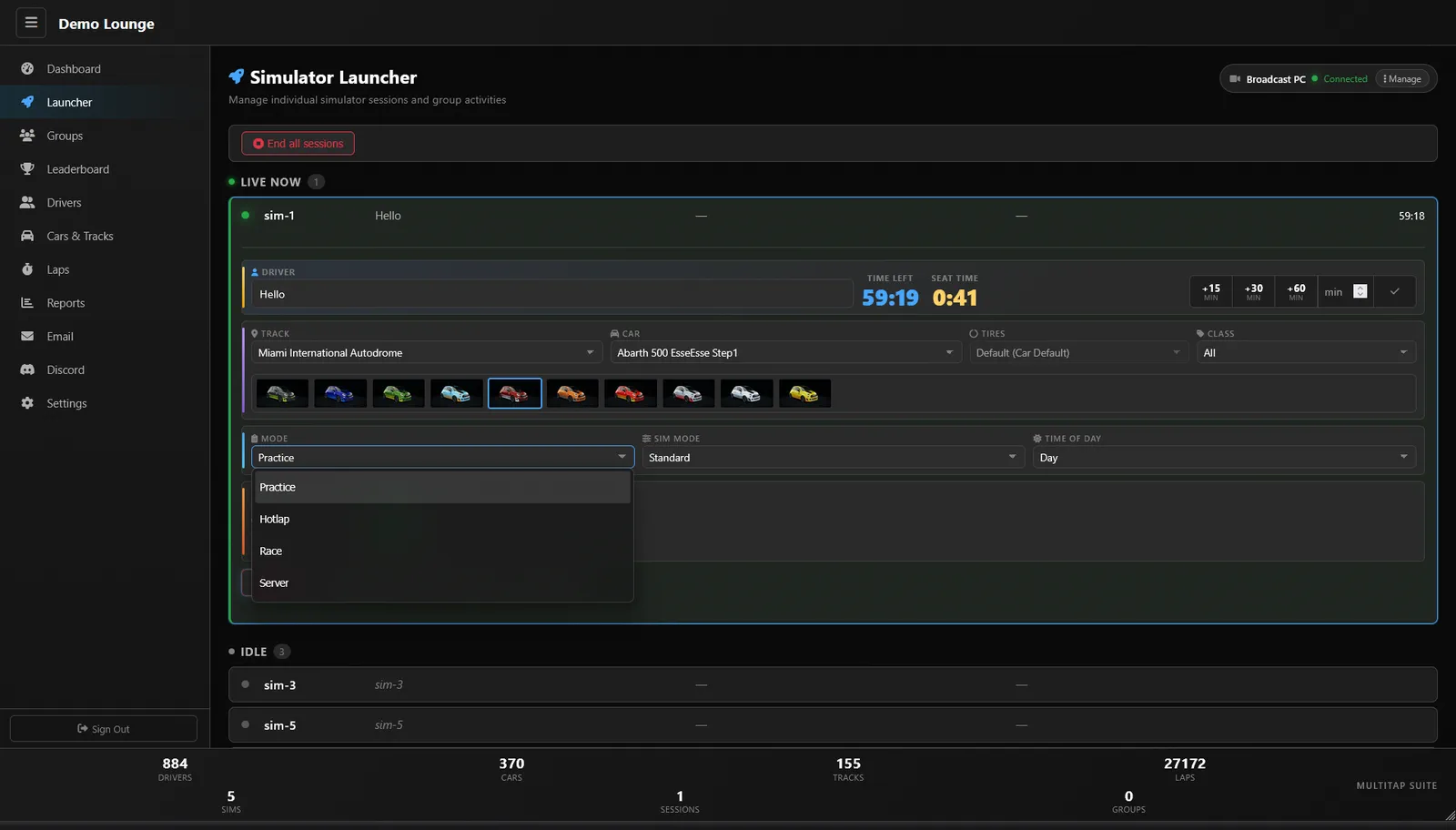
Most conversations about racing simulator management software start at the front desk: who's booked, who's paid, how long they've got. That matters, but it skips the part your customers actually touch. The rig is where a session either feels like a premium attraction or like someone's home PC with a wheel bolted on. So this post walks the floor from the seat outward, looking at what good management software should do at each rig, and how Multitap handles it.
If you've already read our take on what sim center management software should do, think of this as the hands-on companion. Less about the big picture, more about the moments that happen fifty times a night.
Racing Simulator Management Software Starts at the Seat
Picture a first-timer climbing into a rig. If the first thing they see is a Windows desktop, a game menu and a keyboard, you've already lost a bit of the magic, and you've probably also signed a staff member up for a walk across the room. A proper sim racing rig launcher hides all of that.
On Multitap, every sim runs the launcher full screen with Windows hidden behind it. Drivers wake it with any button, then pick their event, car, track and mode using the wheel, paddles or button box. When the lights come on they hold a button to start. You map the controls once on each rig, and after that the keyboard is locked down so nobody wanders into the desktop. There's an on-screen keyboard for names, so even entering who's driving doesn't need a real one.
That one change does more for a commercial sim racing floor than it sounds. Fewer staff trips, fewer "it's stuck on a menu" moments, and fewer curious teenagers alt-tabbing into places they shouldn't be.
Starting and extending sessions from wherever you are
The other half of the rig experience is how quickly staff can act on it. With Multitap Cloud, the admin panel lives at your own venue web address and works in any browser. You can start a session from your phone in the parking lot, add fifteen minutes from the tablet at the front desk, or check the floor from your laptop at home. The launcher view refreshes every few seconds, so you can see what each rig is doing without walking over.
Keeping Every Rig Identical Without a Weekend of Copying Files
Here's a problem every sim racing lounge owner hits eventually. A regular asks for a car that's on rig 3 but not rig 7. Or a new track pack goes on two sims and never makes it to the rest. Before long, group races fail to start because one machine is missing content, and someone spends a Sunday morning with a USB stick.
Content sync is the fix, and it's one of the least glamorous but most valuable jobs management software can do. In Multitap you pick one master sim that has everything, choose what to copy, and press Sync all sims. It copies cars, tracks, Custom Shaders Patch, apps and any extra folders you choose to every rig over your venue network. Only new or changed files move, an interrupted copy picks up where it stopped, and a rig in the middle of a session waits until the driver is done. Nobody gets kicked out of a hot lap because you decided to add a car.
Driver Profiles: Turning Laps Into People
A lap without a name attached is just a number. Sim racing driver profiles are what turn that number into a customer you can recognize, email and invite back.
In Multitap, every person who drives at your venue gets a driver record. Put a tablet at the desk showing your registration page and customers sign themselves up with first name, last name, email, an optional birthdate and social handle, and a checkbox agreeing to receive email from the venue. Expand a driver in the admin panel and you'll see their total and valid laps, games played, favourite car and track, their five best laps and recent visits. Birthdates feed the birthday email, which is a nice touch that runs without anyone remembering it.
Profiles also go beyond your four walls. Every lap recorded syncs to the global VenueLaps server, which gives each driver a public profile anyone can look up and ranks them against drivers at other venues. For a competitive regular, that's a reason to keep coming back to your rigs specifically, because that's where their times count.
Clean data matters here too. The lap editor lets you invalidate dirty laps, fix a car or track that was reported wrong, and rename anonymous drivers, so the records on your boards stay legit.
Auto Spectator Mode: The Room Watches Itself
The last piece is everyone who isn't in a seat. Friends waiting their turn, parents, the group that showed up early for a party. A sim racing auto spectator feed keeps them watching instead of checking their phones, and it works best when nobody has to run it.
Multitap's broadcast PCs join your group races automatically and cycle through the camera angles you set up once for each track, so spectators get a TV-quality feed without a staff member playing director. Between races they play your own idle video and logo, and you can send a broadcast PC to any race from the admin panel. Pair that with live leaderboard screens and the whole room feels like race night, even on a regular Tuesday. One broadcast PC is included with Multitap Cloud, and extra broadcast PCs are $22.50 a month each, as listed on our pricing page.
What to Check Before You Commit
When you're comparing racing simulator management software, sit in the rig and run through the night from the customer's side. Can a first-timer start a session without touching a keyboard? Can staff extend time from a phone? Does adding a car to one rig mean adding it to all of them by hand? Do laps turn into driver records you can actually use? And is there something on the TVs when nobody's racing?
Multitap Cloud is $35 per sim, per month, and if you're running 10 or more sims, $325 a month covers your whole venue. It's month to month with no setup fee and no contract. You can see the full rundown on our features page, start from the Multitap home page, or book a free demo call and we'll walk your floor with you, rig by rig.
See Multitap in Action
Explore lap-triggered marketing, VenueLaps and the Discord engine in the self-guided public demo.
Try the Demo →