Gaming lounge marketing automation sounds like something a casino or a mobile game studio buys, with a dashboard full of funnels and a team to run it. For a lounge with a row of racing rigs, it's a lot smaller and a lot more useful than that. It means the laps your customers set tonight turn into emails and Discord posts on their own, so the people who had a good time hear from you again without anyone at the desk writing a newsletter at closing time.
We build Multitap for sim racing floors, so this guide is about the racing side of a lounge. It isn't a list of marketing ideas. It's the order we'd switch things on in, and the settings that keep automated messages welcome instead of annoying.
What gaming lounge marketing automation actually means on a racing floor
General marketing tools need you to feed them something: a list, a campaign, a reason to write. Racing rigs produce their own reasons all night long. Somebody sets a personal best. Somebody takes a track record. Somebody gets bumped out of the top ten by a friend. Each of those is a message a driver actually wants to get, because it's about them and not about your Tuesday special.
That's the whole idea behind the marketing automation in Multitap. Every lap is a touchpoint, and sessions turn into emails, Discord posts and leaderboard updates without staff involvement. You can see how it sits next to the launcher and the leaderboards on the features page. The rest of this post is about setting it up sensibly.
Start with consent, because nothing sends without it
The least exciting step comes first. Driver emails are off by default in Multitap, and they stay off until you add your venue's postal address, which gets printed in the footer of every driver email. Marketing emails only go to registered drivers who have an email address on their record and agreed to hear from you.
There's one more catch that trips up new venues. Emails about laps need the driver's in-game name linked to their record, otherwise the system can't tell whose lap it was. The Email page shows you the gap in plain numbers, as a line telling you how many of your drivers lap emails can actually reach. If that first number is small, linking names on the Drivers page is the highest-value marketing job in your building this week, and it costs nothing.
Every message carries an unsubscribe link, and drivers can opt out of single email types instead of everything. That matters more than it sounds. A regular who's tired of weekly digests can drop those and still get told when their record falls.
The emails to turn on, in order
Once the driver switch is on, you choose which emails go out on the Notifications tab. Some start on and some start off. Here's the order we'd think about them in.
- Session Summary. This goes out after a driver's visit ends, with their seat time, laps, clean laps, the cars and tracks they drove, and highlights from your boards. It's the first email a new customer gets from you, and it reads like a receipt for a good night. Visits under three laps are skipped, so somebody who sat down for a photo doesn't get one.
- Time Beaten. When someone else's lap pushes a driver out of the top ten on one of your all-time boards, they get an email naming who did it, the time, the car and the gap, with a button to see the board. There's a stricter mode that fires on any drop inside the top ten. We'd start with the default and only tighten it if your regulars ask for more.
- Milestone Celebrations. A new record, a personal best or a driver's first ever lap at your venue. It's the friendly counterpart to Time Beaten, and it gives first-timers a reason to remember your name.
- Comeback Reminders. These start off. They go to drivers who haven't visited for a set number of days, and they tell the driver how long it's been, which records were set since, and where they still stand on their favourite tracks. Turn this on once you've been open long enough to have lapsed customers worth writing to.
- Weekly Digest and Birthday Emails. Both start off. The digest shows each driver their own week next to the venue's, including where they moved on your boards. Birthdays go out on the date on the driver's record, and you can write the greeting yourself.
If you run hotlap challenges, three more emails cover a challenge going live, a driver losing their spot, and the final results. Those are worth leaving on, since a challenge with nobody told about it is just a quiet leaderboard.
Set the limits before you worry about volume
The fear with any automation is that it turns into spam. The answer is in the rules, and the defaults are already conservative. Under Behavior Settings there's a cooldown per driver per board (24 hours by default) and a cap on emails per driver per day. The comeback threshold and its minimum gap are 30 days each, so a lapsed driver hears from you about once a month at most. A driver who gets knocked off several boards by one lap gets one email covering all of them, not a pile.
You can also rewrite any email in the template editor. Change one sentence so it sounds like your lounge, save it, and leave the rest alone. Your logo and primary color carry through on their own. The full walkthrough is in the email guide.
One more thing worth switching on is for you, not your drivers. The weekly venue summary lands in your inbox with laps, unique drivers, active days, seat time, top tracks and cars, and how the mail system performed. It's the quickest way to see whether any of this is doing its job.
Let Discord carry the room between visits
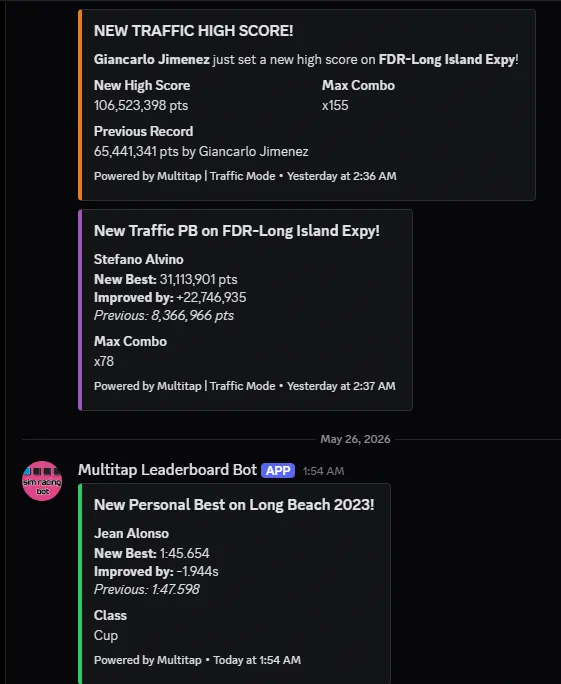
Email reaches one driver at a time. Discord shows the whole community what just happened. The Multitap bot joins your venue's server, you pick a channel, and it posts as things happen on your rigs: track records, top ten entries, new cars and tracks, traffic scores. It starts on a Highlights preset, which is where we'd stay for the first month. Personal bests, improvement streaks and first-lap welcomes are extra toggles, and they're great in a small server and noisy in a big one.
Two details keep it tidy. Every lap gets at most one post, however much it achieved, and posts never ping anyone. Members can also pull up boards and stats themselves with slash commands like /leaderboard and /records, which gives people a reason to open your server on a night they aren't driving.
Where this fits on a mixed floor
A fair warning if your lounge is mostly PCs and consoles: everything above runs on lap data, so it covers your racing rigs and not the rest of the room. Multitap launches Assetto Corsa sessions and records laps from ACC and iRacing on the same boards. It doesn't replace the gaming center software that times your PC stations, and we wouldn't pretend it does. What it gives the racing corner is a marketing loop that the rest of the floor usually doesn't have, where the product itself keeps writing to your customers.
Multitap Cloud is $35 per sim, per month, with all features included, so the email and Discord tools aren't an add-on. If you'd like to see the Email and Discord pages before you commit to anything, the live demo login is on our homepage, or you can book a demo call and we'll walk through the setup with you.
See Multitap in Action
Explore lap-triggered marketing, VenueLaps and the Discord engine in the self-guided public demo.
Try the Demo →