Most sim racing weeknight promotion ideas are built for one driver at a time: a cheaper hour, a hot lap contest, a discount code. I covered that side in my post on off-peak promotions, so this one goes after the other lever, which is the group. Four friends on a Wednesday fill four rigs at once, they book ahead, and they usually bring somebody new the next time. Below are the group formats worth running on a weeknight, how to package them as a booking offer, a challenge of the week that brings crews back, and the setup that lets one person at the desk run the whole thing.
Sim Racing Weeknight Promotion Ideas Built Around Groups
A group promotion works on a quiet night because the decision gets made once, in a group chat, instead of four separate times. Your job is to give that chat something specific to agree on. A few formats that do it well:
- Crew night. One fixed weeknight for parties of three or more, sold as a block with a race at the end. The point isn't a lower price, it's a named night people can put in a calendar.
- Rookie night. Groups where nobody has raced before. Run them in Standard mode, which turns off fuel use, damage and tyre wear and forces ABS and traction control on. Nobody spends their first twenty minutes spinning into a wall.
- Birthday and after-work races. Same idea as crew night, but the hook is the occasion. Practice, a short qualifying session, a race, a podium. It has a beginning and an end, which is what groups want from a night out.
- The rematch. Every group that races once has a loser who wants another go. Invite the same crew back for a rerun on the same track with the same cars, and let the old result do the selling.
Pick one or two and give each a home night. Running all four at once just spreads a small weeknight crowd even thinner.
Package a Sim Racing Venue Group Booking Offer
A group offer only works if booking it is painless. If the organizer has to call, wait for a callback and then text everyone a time, half of these nights die before they're booked. This is where bookings in Multitap Cloud earn their place. You set the session lengths customers can choose, a price per rig for each length, and opening hours for each weekday. If you run motion and static rigs, you can tag them by type and add a surcharge per rig of a given type, so a crew that wants the motion rigs sees that price up front. Prices show on the booking page and in the confirmation email, and the customer pays at the venue.
The customer side is a single page at your venue's booking link that works on a phone. The organizer picks a session length, how many rigs, a date and a start time, and only starts with enough free rigs for the whole session are offered. Max party size is yours to set, so a crew night can take a full row of rigs in one booking. You can also paste an embed snippet onto your own website so the booking page sits inside it. Confirmations and reminders go out by email on their own.
The trick to packaging is to make the weeknight choice obvious. A longer session length that you only really promote for crew nights, a clear line on your site that says which night it is, and a booking link in every post about it. On the staff side, the schedule grid shows each rig as a row, and you can mark bookings completed or no-show. After a month, that tells you plainly whether crew night is filling or just sitting on a flyer. If a private group wants a specific rig held, a maintenance block takes it out of availability for that window, though it won't cancel bookings already sitting there, so check the row first.
Run a Sim Racing Challenge of the Week
A group gets you one visit. A sim racing challenge of the week is what turns it into a habit. The mechanic is simple: one track, one car, a board that resets every Monday. In Multitap, a leaderboard is just a saved set of filters, and one of those filters is a date range. Set it to This Week, which runs from Monday, and the board clears itself without anybody on staff remembering to do it. You can keep up to twenty boards, so the weekly challenge can live next to your all-time boards rather than replacing them.
Put it on a TV with one of the Hi-Fi layouts and the room does the promotion for you. Rows slide in, a new fastest lap flashes gold, and an improved row flashes green. The activity feed calls out new records and personal bests across the venue as they happen. For a group, that means the friend who was fourth on Tuesday has a very specific reason to come back on Thursday.
The follow-up matters as much as the board. With driver emails switched on, Multitap sends a Time Beaten email when a driver gets pushed out of the top ten on a class-and-track board, with the new time and who set it. That's a better weeknight promotion than anything you'd write yourself, because it's personal and it's true. It only reaches drivers who registered with an email and agreed to hear from you, so it's worth getting crews to register at the desk while the night is still fun.
Make the Group Night Easy to Run on a Slow Shift
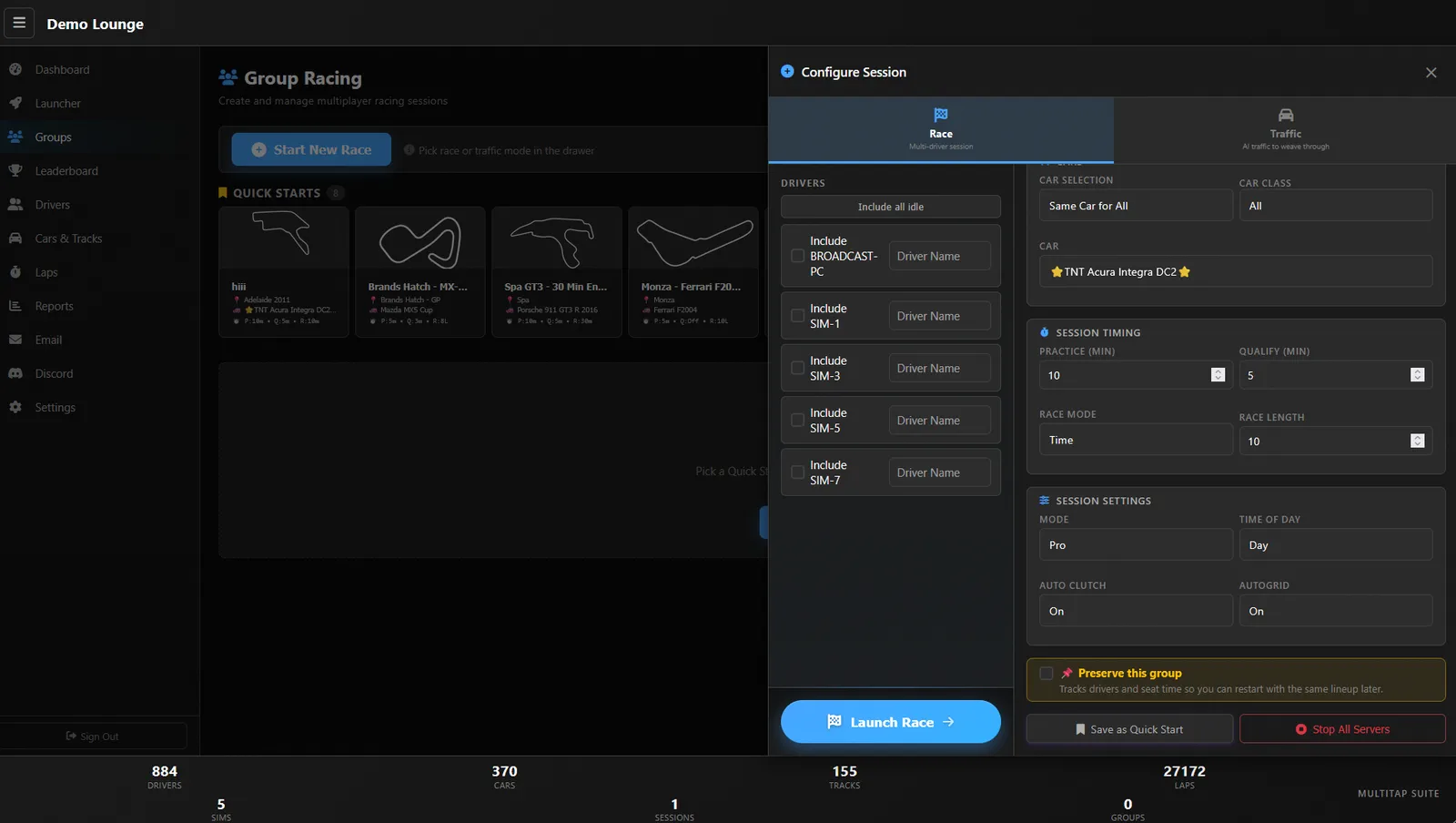
Weeknights usually mean one person on the floor, so a group format has to launch fast. Save your crew night setup as a Quick Start, with a name like Birthday GT3 sprint, and the track, car, timing, mode and time of day fill themselves in. Staff tick the rigs, type the driver names and press launch. Multitap starts a private Assetto Corsa server for the race, seats each rig with its driver and car, and launches the game on every screen. If the group wants to pick their own cars, Driver Chooses lets each driver choose on the rig with the wheel before the race starts.
For the rematch offer, tick Preserve this group before launch. Multitap keeps the roster, which rigs, which drivers and how long they sat, under Saved Lineups, ready to relaunch on their next visit. And if you have a TV for spectators, the auto-spectator joins group races by itself and cycles through the camera angles you set up once. Friends who are waiting their turn get something to watch, which keeps the group in the building.
If you'd like to try this before Multitap Cloud launches on October 7, the demo at demo.mlttp.com runs simulated rigs, so you can set up a Quick Start and a weekly board without installing anything. You can read more on the Multitap homepage, grab an optional 1-on-1 setup session, or drop by NXT LVL Gaming in Miami to watch it run a live floor.
See Multitap in Action
Lap-triggered marketing, TAPPED IN, and the Discord engine, live and unscripted. Try the public demo or book a walkthrough.
Make an Inquiry →