A racing simulator booking system does one job really well: it sells a rig for a block of time and takes the money. The part most owners underestimate is what happens next, when that booked customer walks in the door and has to end up in a seat, driving, with the clock running and their laps landing somewhere they'll actually look. That handoff is where floors get slow, staff get stuck at the desk, and a paid hour quietly turns into forty minutes of driving.
We've already written about choosing between walk-in, reserved and hybrid floors. This one picks up at check-in and walks through what your booking tool and your sim racing venue software each need to do so the handoff feels instant.
What a racing simulator booking system should hand off at check-in
Think of the booking as a ticket with three pieces of information on it: who's driving, how long they paid for, and whether they came alone or as a group. Every problem at the front desk comes from one of those three getting lost between the calendar and the rig.
Who's driving. Your booking tool knows the customer who paid. Your rig software needs to know the driver who's sitting down, because that's whose laps go on the board and whose inbox gets the follow-up. With Multitap, customers can register as drivers from your public registration page, and you can bring existing customers in from a CSV on the Drivers page. If your booking or POS tool can export a customer list, that's your bridge on day one.
How long they paid for. This is the one that costs real money. Staff start, extend and end sessions from the Launcher page or the staff kiosk, so the person checking someone in is the same person putting time on the rig. On Multitap Cloud the admin panel runs in any browser, which means you can add fifteen minutes from the tablet at the front desk instead of walking to a PC in the back.
Solo or group. A party of six booked as one block shouldn't become six separate check-ins. More on that below, because groups are where most booking setups fall apart.
Keep the booking tool you have
A lot of owners assume switching venue software means ripping out the calendar and payment setup they already trained staff on. It doesn't have to. Multitap works alongside whatever you use for bookings and payments today, and bookings and payments run through a partner integration so customers book and pay in a system built for it while you keep one front desk. The same goes for a gaming lounge POS system: whatever rings up the drinks and the session time can stay exactly where it is.
What Multitap covers is everything after the customer sits down: the session on the rig, races and leagues, leaderboards and screens, and the emails and Discord posts that bring them back. Drivers don't need a keyboard either. Every sim runs the launcher full screen with Windows hidden behind it, and drivers pick their event, car, track and mode with the wheel, paddles or button box, then hold a button to start. That alone cuts a couple of minutes off every check-in, because staff aren't kneeling next to a rig with a mouse.
If you want your own systems to react to what happens on the floor, the Multitap API lets your website, app or in-house tools read leaderboards, laps, drivers, traffic scores and content, and webhooks tell your systems the moment a lap is completed, a personal best is set or a record falls. It's included with every full Multitap Cloud venue. You can see the full list on the features page.
Group bookings, parties and the Saturday rush
Groups are where a booking calendar stops being enough. The calendar can hold four rigs for a birthday party from 7 to 9, but it has no idea who drives next, how long each guest gets, or what goes on the TV.
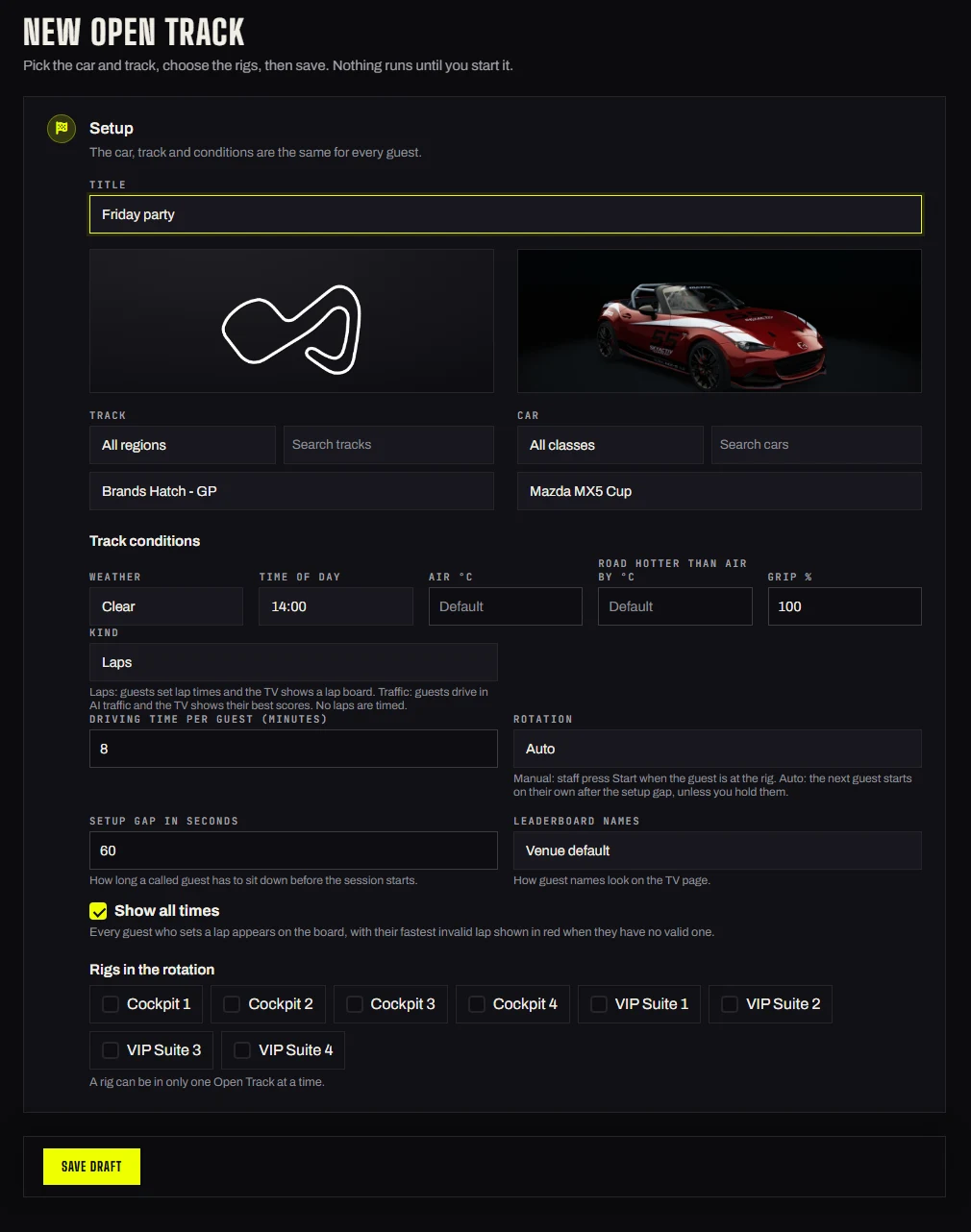
For parties and team events, Open Track handles that part. You load the guest list ahead of time, type names in, or import a CSV, then start it on the night. The queue calls each guest to the next free rig for the driving time you set, either when staff press Start or on its own after a short setup gap, and Hold or Not here pauses anyone who isn't ready. A TV page shows the leaderboard with your logo and colour, who is up next and a live map of the cars. Guest laps stay on your own boards and never go to VenueLaps, Discord or your driver records, which matters when the guests are kids or a client's employees.
For friends who booked a few rigs together and just want to race each other, customer group sessions let a logged-in driver host a race, practice or traffic session from their rig with the wheel. Friends join from their own rigs and pick their cars, and the host starts it once two drivers have picked. Your staff see every session on the Groups page and can cancel it or launch it, and a staff action always comes first. It's off until you turn it on, and it needs launcher 1.5.0 on the rigs.
Put those two together and a busy Saturday looks different. The booking tool sold the blocks. The desk checks people in and adds time. The rigs run themselves, and the screens keep everyone in the room watching instead of asking how much time is left.
After the session: the part the booking can't do
A booking system is great at getting someone in once. Getting them back is a different job. Every lap updates your leaderboards and sim racing TV leaderboard displays, and Multitap turns those laps into Discord posts, driver emails, challenges and global rankings. Drivers hear about beaten times, milestones, birthdays and weekly digests without you writing a thing, which is how the person who booked one hour last month ends up booking again.
If you're still working out whether the money side holds up, our sim racing venue ROI breakdown is a good place to start on the question of whether a sim racing business is profitable. On the software line, Multitap Cloud is $35 per sim, per month, and if you're running 10 or more sims, $325 a month covers your whole venue. It's month to month with no setup fee.
The easiest way to judge the handoff is to drive it. Log into the live demo at demo.mlttp.com with [email protected] and the password letsgo, try a group race, then poke around the launcher. If you'd rather talk it through with us and figure out how your current booking setup fits, book a free demo call, or head back to the Multitap home page to see the whole stack.
See Multitap in Action
Explore lap-triggered marketing, VenueLaps and the Discord engine in the self-guided public demo.
Try the Demo →