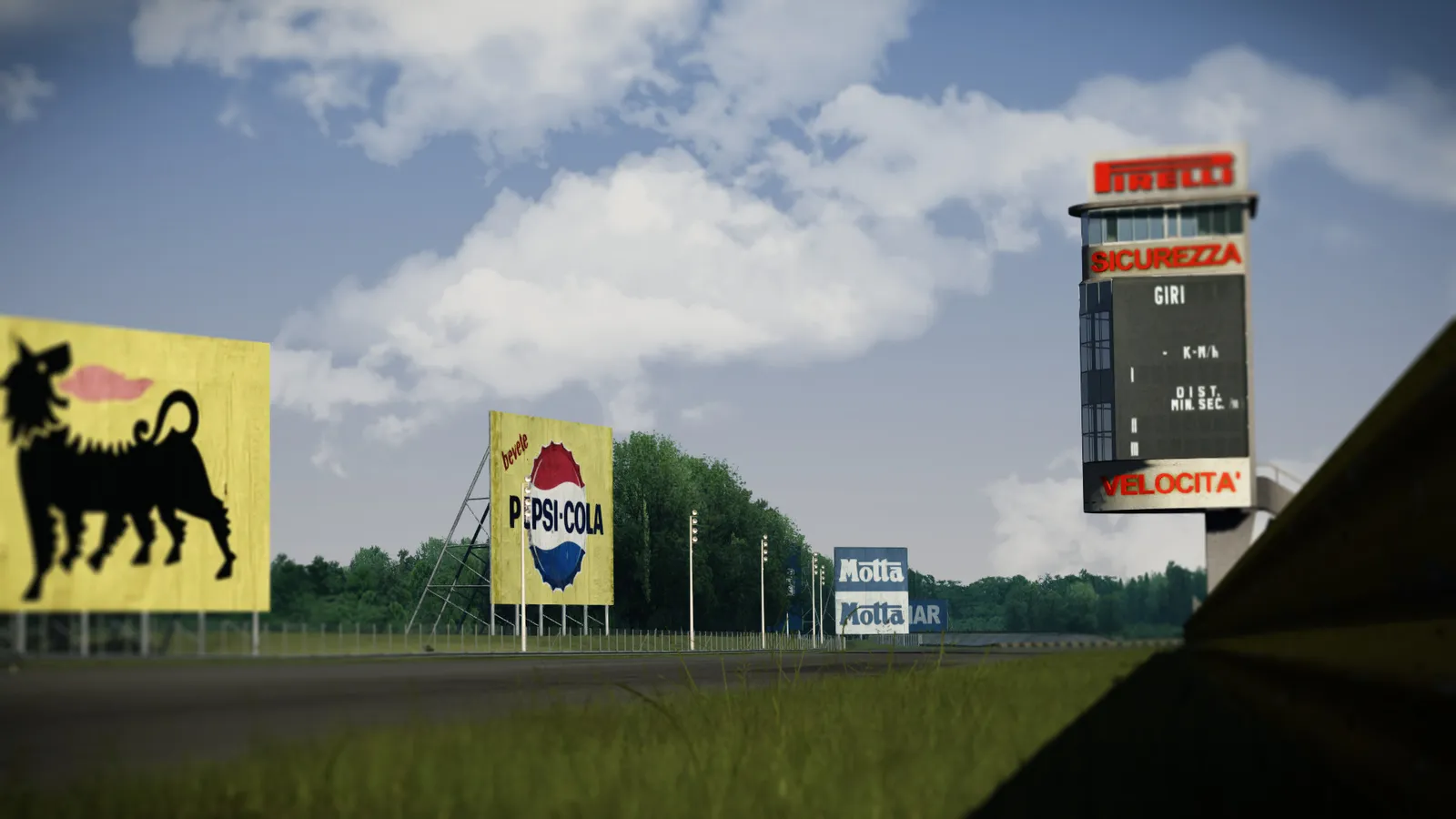
Drive a lap of almost any track in Assetto Corsa and count the billboards. There are banners over the start line, boards along the pit wall and signs on the bridges and the outside of the fast corners. Your drivers look at them again and again every night, and until now every one of them advertised somebody else.

The newest part of Multitap changes that. A new Sponsors page in the admin panel lets you put your own sponsors' logos on a track's billboards and push them to every sim in your venue. Your league night's title sponsor can be on the start-finish banner. The tire shop down the road can own the boards on the main straight. The energy drink you sell at the counter can be on the bridge.
Why this matters for a sim racing center
Most sim centers already have sponsorship conversations. A local business backs a league, a brand supports an event, or a regular who owns a shop wants their name somewhere. Until now the only places to put that name were a poster on the wall, a logo on the leaderboard TV, or a mention on social media.
Billboards inside the game are a different kind of placement. They sit right in the driver's line of sight while they're focused and having fun, and they show up again in every replay, every stream and every phone video someone takes of the rig. That makes it something you can actually sell, with a clear answer to "what do I get": your logo on the track, on every rig, for as long as the deal runs.
A few ways venues can use it:
- Event sponsors. Brand the track for a league night, a corporate event or a tournament, then put it back afterwards.
- Local business packages. Sell the boards on your most popular track to nearby businesses by the month.
- Your own promotions. No sponsor yet? Put your venue's logo, your party packages or your next event on the boards.
How it works
Everything happens on the Sponsors page in the admin panel, in four steps.
1. Load the track
Pick a track from the list. It shows the tracks your sims have reported to Multitap Cloud, so your mod tracks are there too. Click Load from sim and one of your sims reads the track's textures and sends back small pictures of them. Nothing on the sim changes while it does this.
2. Upload your logos
Upload each sponsor's logo for that track as a PNG, JPG or WebP and give it the sponsor's name. A PNG with a transparent background looks best.
3. Pick a texture
Multitap lists the textures whose names look like ad boards, banners or logos under Suggested, so the billboards are usually right at the top. You can also search every other texture by name.
One thing worth knowing: the original Kunos tracks usually pack many boards into one big texture. On Vallelunga, a single 2048 by 2048 texture called sponsors1.dds holds most of the trackside ads. Mod tracks more often use one texture per board. Either way, you see the whole texture and place your logo exactly over the board you want.
4. Place logos and push to your sims
Click Add logo and drag it onto the board. You can resize it, turn it, choose Fit inside, Fill and crop or Stretch, and add a background color that covers the old ad completely. When it looks right, click Push to sims.

Each sim updates its boards the next time it's idle, so nobody's session is interrupted. The page shows where every sim stands: waiting because the rig is busy, applying, applied, or offline and getting it as soon as it connects. Your broadcast PCs get the same boards, so the logos show up on your stream too.
See the admin panel for yourself
Walk through Multitap's admin panel in the public demo, then start a free trial on your own rigs.
Try the demo →What drivers see
Once a sim has applied the push, the logos are simply part of the track. They're on the boards in every session type, from solo hotlaps and traffic to group races and challenges.


Safe for your rigs and your online races
I built this so it can't get in the way of running a venue:
- Only your rigs see it. The logos live on your venue's sims and broadcast PCs. Nobody else's game changes.
- The track files are never edited. Multitap installs the new boards next to the track instead of changing its model files, so joining online servers works exactly as before.
- One click puts it all back. Remove from sims takes your sponsors off every sim and the track's original boards return. Your setup stays saved, so you can push it again later.
- Swap sponsors any time. Change a logo and push again, and every sim updates to the new version the next time it's idle.
A couple of honest limits. Your sims need Custom Shaders Patch installed. Some tracks ship with locked files, and those can't be branded; Multitap tells you when that's the case. And for now this covers track billboards only, not car liveries.

Included with Multitap Cloud
Sponsors isn't an add-on. It's part of Multitap Cloud, alongside the rig launcher, leaderboards, challenges, traffic, VenueLaps and the rest of the platform. If you already run Multitap, the Sponsors page is in your admin panel now. Keep your rigs on the latest launcher and they're ready for it.
If you're not on Multitap yet and you've been looking for a way to make sponsorship pay at your venue, try the demo, read the full feature list, or send me a question. I'd love to hear what you put on your boards first.
Put your sponsors on the track
Sponsors, leaderboards, challenges and remote launch, all included per sim. Start a free trial on your own rigs.
Start your free trial →Track images are in-game screenshots from Assetto Corsa by Kunos Simulazioni. The billboards shown are the game's original ads, before any sponsors are placed.