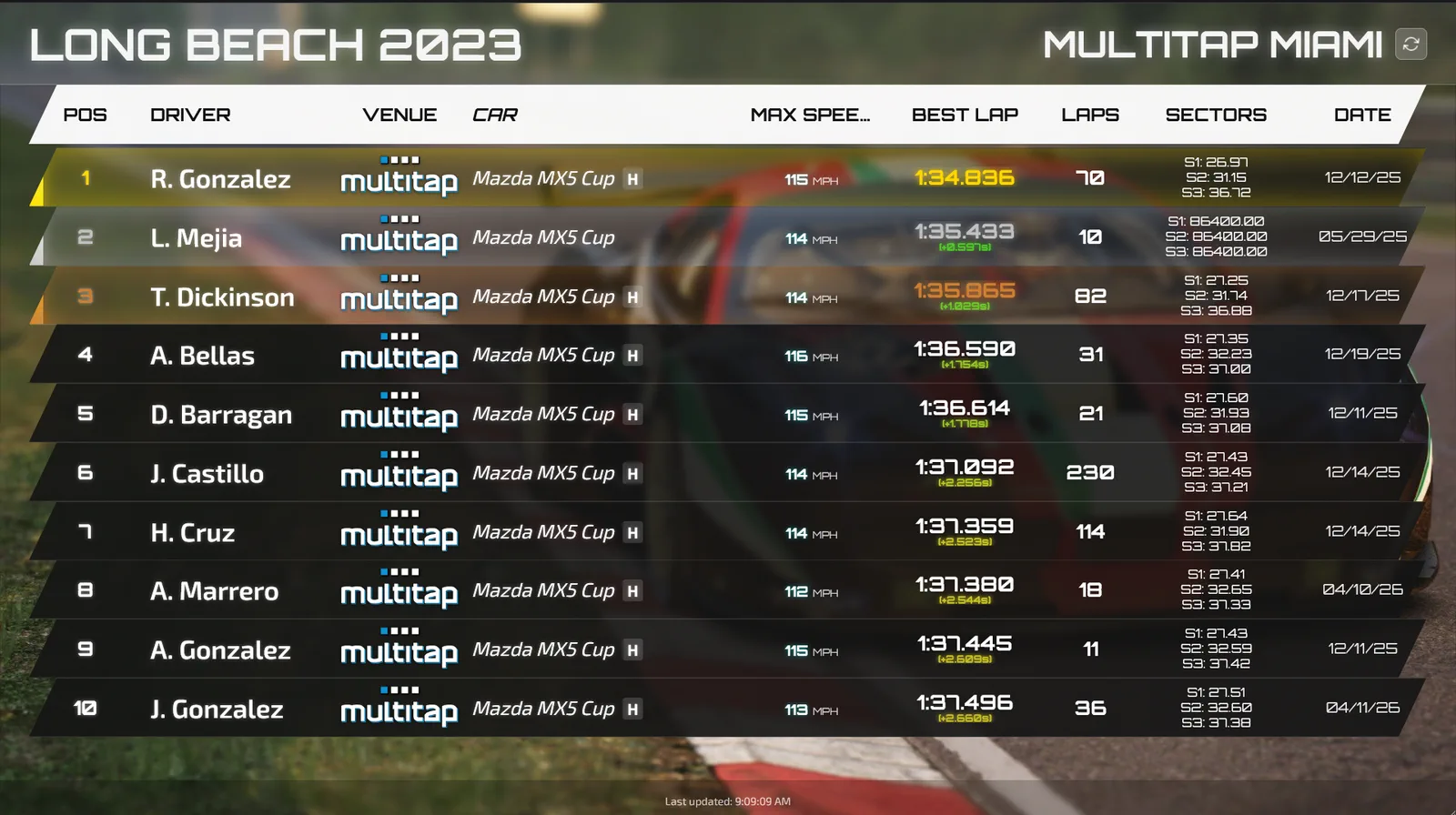
If you've ever watched a driver climb out of a rig, glance at the TV, and climb straight back in because they're 0.2 seconds off third place, you already understand what good sim racing leaderboard software is for. It isn't decoration. A board that updates the moment a lap is set turns a one-off session into a reason to come back, and a board that lags, shows junk laps, or only covers one track does the opposite. This post walks through what the software should actually do on your floor, the difference between in-venue and global boards, and the settings that matter most for Assetto Corsa venues.
What sim racing leaderboard software has to get right
Start with speed. The whole point of a venue board is that the driver sees their name before they've unbuckled. In Multitap, every lap updates the boards within seconds of the driver crossing the line, and the TV pages refresh every ten seconds without anyone touching them. If your current setup needs someone to export times or refresh a browser, that's the first thing to fix.
Next is flexibility. One board for one track gets stale fast. Multitap treats a leaderboard as a saved set of filters, so you pick the game, track, car class, car, date filter and organization, and you can keep up to twenty of them. That lets you run an all-time board for your hero track next to a "today's fastest" board that a first-timer can actually crack. The date filter options are All Time, Today, This Week and This Month, which covers most of the rotations venues run.
Then there's trust. Racers only care about a board if the times on it are real. A good system ranks one row per driver per car (their best valid lap) and doesn't quietly hide invalid laps. Multitap shows a driver whose only laps are invalid faded and struck through below every valid row, so a cut corner is visible rather than buried. When something slips through, the lap editor lets you invalidate dirty laps, fix a car or track that was reported wrong, and rename anonymous drivers so your records stay legit.
Finally, it has to look like your venue. Boards come in portrait and landscape layouts, plus animated Hi-Fi versions where rows slide in and a new fastest lap flashes gold. You can pick a theme or your own colors, add sponsor logos and a background, and set how many rows show per page. Edits reach the TVs in about ten seconds, so you can tweak a board between sessions on a busy night without walking over to the display PC.
In-venue boards vs global leaderboards
Your in-venue boards are about the room. They're the thing a group of friends argues over, and they're where regulars build a reputation. Organization filters help here: you can build a board that ranks only the members of one company, school or club, which is handy when a team building group or a school league wants its own standings on the screen.
Global boards solve a different problem. Once a regular has beaten everyone in your building, the board stops pulling them back. Multitap syncs every recorded lap to VenueLaps, a public leaderboard at venuelaps.com with leaderboards between venues on every track, driver rankings and a public profile for every driver. You can also turn on "Include VenueLaps times" on your own boards (it works on any board except one set to a single date), and the best times set on the same track at other venues show up in your ranking with a small globe and the venue's name. Your fastest local suddenly has someone new to chase, and they don't have to leave your rig to do it.
Publishing is under your control. There's a switch in Settings to publish laps to VenueLaps, and turning it off hides your venue's laps without deleting anything. Only laps by registered drivers appear on VenueLaps, which is a nice nudge for walk-ins to register at the desk.
Assetto Corsa leaderboard software: the details that matter
Most venues run Assetto Corsa as the main game, so the board has to understand it properly. Multitap launches and manages Assetto Corsa sessions and records laps from Assetto Corsa Competizione and iRacing onto the same boards. Each row shows position, driver, car with a tyre badge, top speed, best lap with the gap to first, lap count, sectors and date, and the top three get gold, silver and bronze rank bars.
Car classes are worth setting up early. Reclassifying a car on the Cars and Tracks page changes which boards it appears on, so a clean class list means a GT3 board isn't polluted by someone's hypercar run. Track layouts are listed as separate tracks too, which saves you from mixing a short layout with the full circuit.
Traffic dodging gets its own display. Traffic sessions rank each driver's best score per track with combo, near misses, closest pass, top speed and date, so your No Hesi-style crowd has something to chase that isn't a lap time.
Turning the board into a reason to come back
A board on the wall is only half the job. The other half is telling people when something changes. The activity feed calls out new records, personal bests, a driver's first ever lap and their first lap on a new track, either as toast popups or a scrolling ticker on a TV. Automatic emails let drivers hear about beaten times and milestones without you writing anything, and the Multitap Leaderboard Bot posts lap PBs, traffic high scores and records into your venue's Discord the moment they happen. Drivers can ask the bot for the leaderboard or their stats with slash commands, which keeps the rivalry going between visits.
Challenges stack nicely on top. A challenge is a contest on one car and one track that runs for up to 90 days, opens and closes on its own, and gets its own public page and big screen display. Put a weekly board and a month-long challenge on the same track and you've got a short-term and a long-term reason to book another session.
If you want to see how this looks on real TVs, the full feature rundown is on the Multitap features page, and the homepage has login details for the self-guided demo so you can build a board yourself before you commit to anything. You can also see the boards running at NXT LVL Gaming in Miami. And if you'd rather have someone walk you through setting up boards for your own floor, book an optional 1-on-1 and bring your track list.
See Multitap in Action
Lap-triggered marketing, TAPPED IN, and the Discord engine, live and unscripted. Try the public demo or book a walkthrough.
Make an Inquiry →